← All prebuilt solutions
Bookkeeping & Compliance

Bank Reconciliation

Match the bank to the books in minutes – and prove it with a signed-off reconciliation

£20

Secure checkout. Your download link is sent as soon as payment clears.
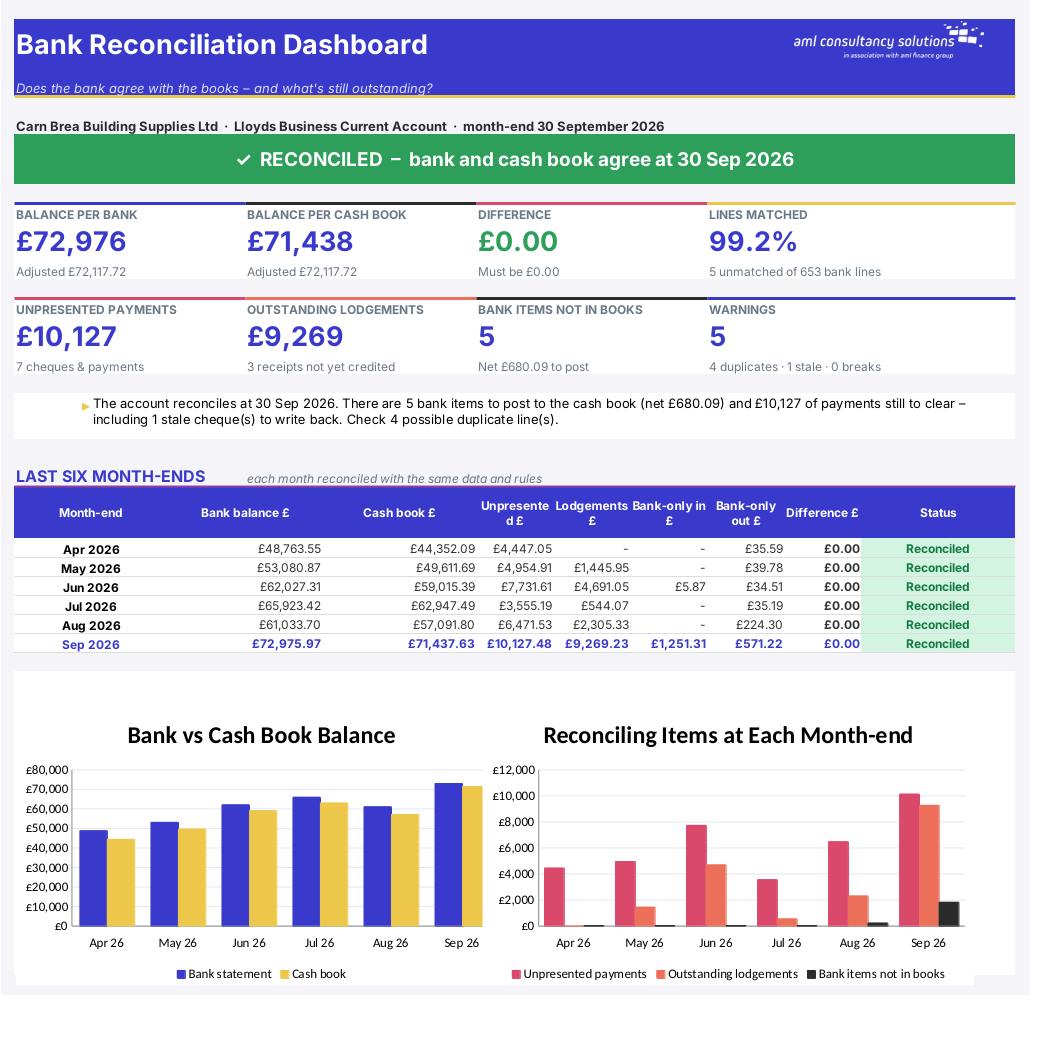
Bank Reconciliation

Overview

A bank reconciliation proves that the bank balance in your books is right. It takes the balance on the bank statement, adjusts it for items that are in your cash book but haven't reached the bank yet (unpresented cheques and payments, outstanding lodgements), and checks the result against your cash book after you've added the items the bank has processed that you haven't recorded yet (bank charges, interest, direct debits). If the two adjusted balances agree, the books are right. This workbook does the matching for you: paste up to 2,000 lines from each side and it pairs them automatically, lists everything that's left, builds the formal statement at any month-end and gives a clear green or red result.

Price
£20
Who it’s for
Bookkeeping & Compliance
Works with
Microsoft Excel for Windows and Mac
Buy now

See how it works

A walk through the main sheets

The sheets you will use most, in the order you will use them – shown with the sample data every workbook comes with.

Step 1

Bank Statement

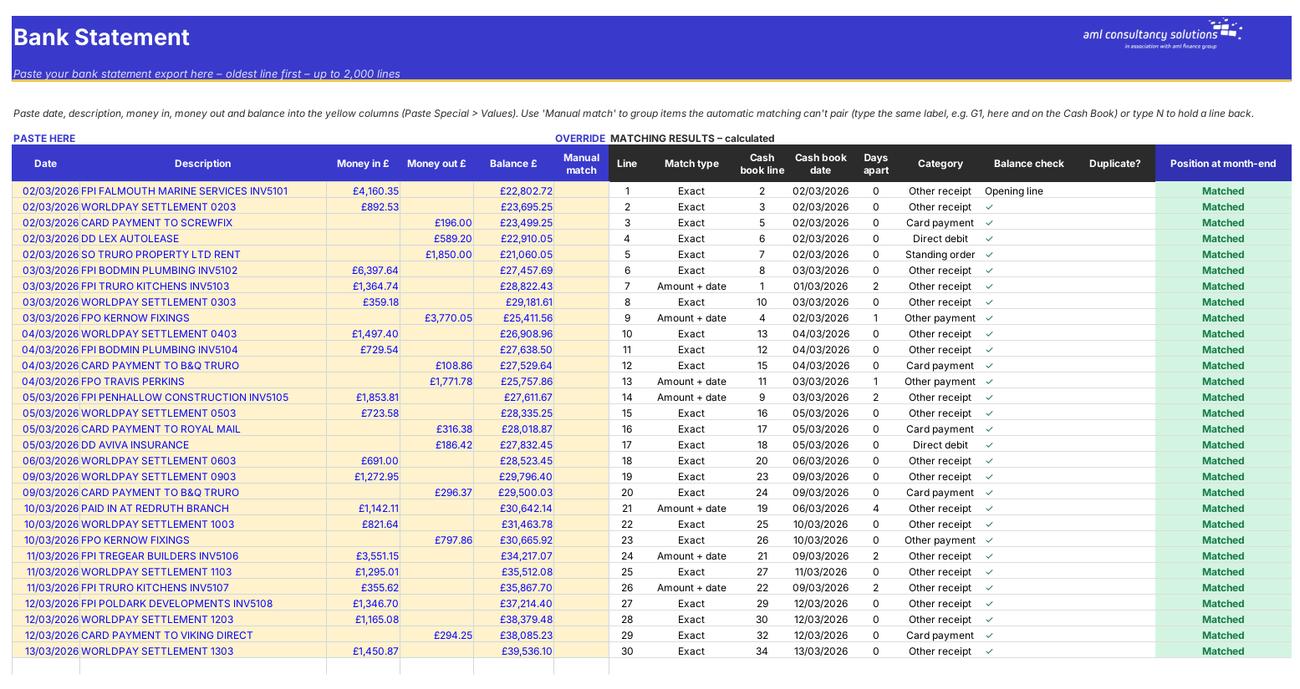
Your statement lines and the matching result for each one. What you do: paste the statement; use Manual match where needed.
Bank Statement
Cash Book

Step 2

Cash Book

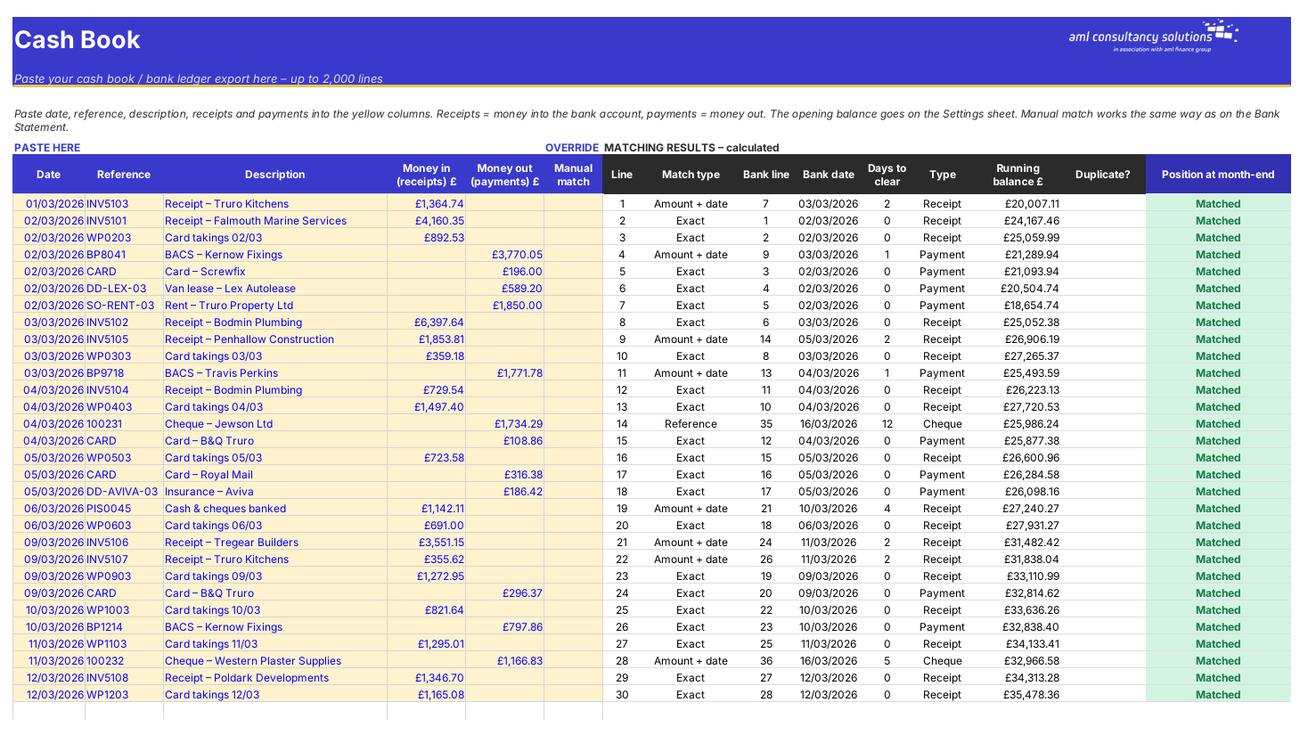
Your cash book lines, running balance and matching result. What you do: paste the cash book; use Manual match where needed.

Step 3

Reconciliation

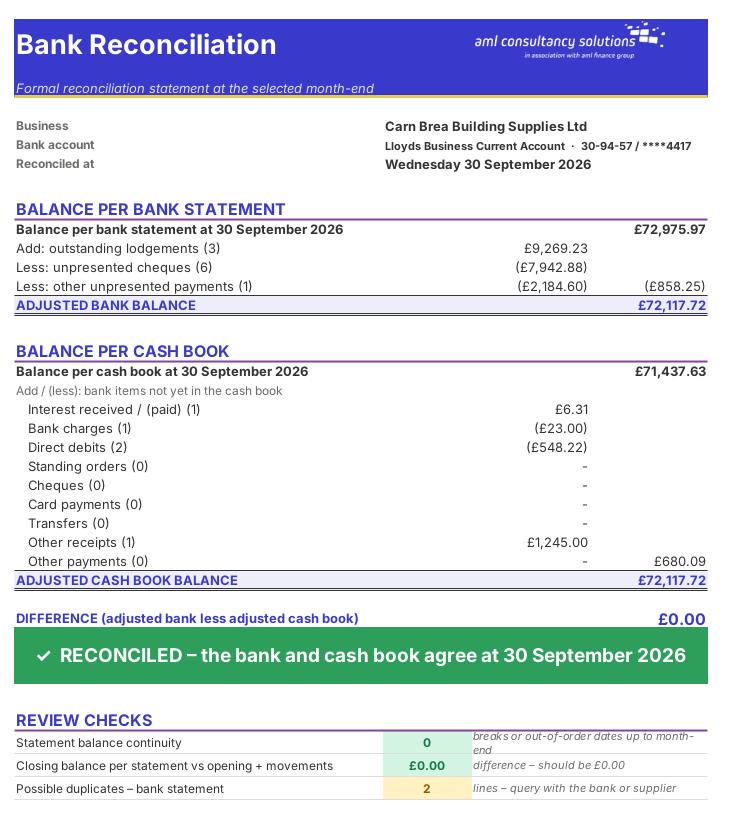
The formal reconciliation statement, review checks and sign-off – fits one A4 page. What you do: enter preparer, reviewer, dates and notes.
Reconciliation
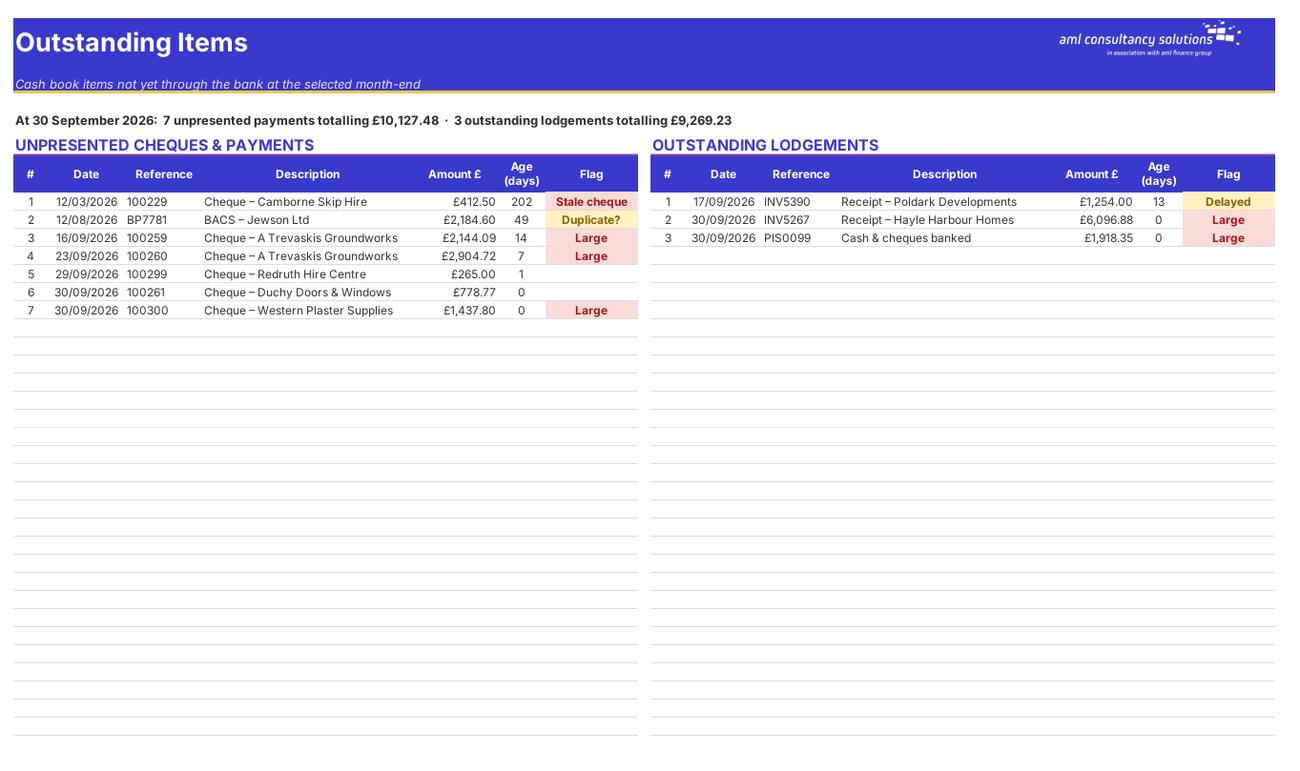
Outstanding Items

Step 4

Outstanding Items

Unpresented cheques and payments, and outstanding lodgements, at the month-end. What you do: review the flags – stale, large, duplicate, delayed.

Who it is for

Made for people like you

  • Example – text
  • Bookkeepers & accountants – A fast, consistent month-end reconciliation for each client bank account, with preparer and reviewer sign-off.
  • Business owners – Confidence that the bank figure in your accounts is right – and a list of exactly what still needs posting.
  • Year-end & audit files – A printable reconciliation statement with supporting lists of every reconciling item.
  • Anyone tidying up old books – Months of statements matched in one go, with duplicates and missing lines flagged.

Quick start

Up and running in minutes

  1. Example – text
  1. Settings – Enter the business name and bank account, the cash book opening balance and its date. Leave the matching rules at their defaults to start with.
  2. Paste the bank statement – Export the statement from online banking as CSV, sort it OLDEST FIRST and paste date, description, money in, money out and balance into the yellow columns of the Bank Statement sheet (Paste Special > Values).
  3. Paste the cash book – Export the bank account transactions from your accounting software (the bank ledger or cash book) and paste date, reference, description, receipts and payments into the Cash Book sheet.
  4. Choose the month-end – Pick the month-end on the Settings sheet. Everything recalculates at that date.
  5. Read the Dashboard – Green banner = reconciled. Then work through the Bank Only Items list (post them to your books) and the Outstanding Items list (check they're genuine timing differences).
  6. Clear up the leftovers – Use the Manual match column for anything the automatic matching missed, investigate duplicates and stale cheques, then print the Reconciliation sheet and sign it off.

Key features

  • Paste up to 2,000 bank statement lines and 2,000 cash book lines – automatic one-to-one matching on amount and date, then on reference text, with manual group matching for anything else.
  • Formal reconciliation statement at any month-end: balance per bank, outstanding lodgements and unpresented payments, balance per cash book and the items still to post – with a clear red/green result.
  • Lists of unpresented cheques and payments, outstanding lodgements and bank items missing from the books, with suggested actions.
  • Statement balance continuity check, duplicate detection, stale cheques, a six-month history and a printable sign-off sheet for preparer and reviewer.

What’s included

  • Dashboard – Is the account reconciled?
  • Settings – Account details and matching rules
  • Bank Statement – Paste the statement here
  • Cash Book – Paste the cash book here
  • Reconciliation – Printable statement and sign-off
  • Outstanding Items – Unpresented payments and lodgements
  • Bank Only Items – Bank lines still to post
  • Checks – Matching stats, continuity, duplicates
  • Guide – How to use this workbook

How buying works

Your file is only released once payment has cleared.

1

Click Buy now

You are taken to our secure checkout.

2

Pay securely

Checkout takes a minute and you get a receipt by email.

3

Download your file

Your download link arrives as soon as payment clears.

Explore the range

Need it tailored to your business?

We can adapt any prebuilt solution or build something bespoke, with a lifetime bug-free guarantee.

Part of AML Finance Group

Need an accountant too?

Our sister firm, AML Accountancy Solutions, is an award-winning accountancy practice helping businesses and individuals across the UK with their accounts, tax, bookkeeping and payroll.

Visit AML Accountancy Solutions

