← All prebuilt solutions
Industry

Campsite & Holiday Park Manager

Tariffs, bookings, occupancy, owners' charges and VAT for campsites and holiday parks

£20

Secure checkout. Your download link is sent as soon as payment clears.

Campsite & Holiday Park Manager

Overview

A campsite or holiday park earns its money a night at a time, across very different kinds of pitch, at prices that change with the season – and on top of that there are seasonal pitch holders and holiday-home owners paying annual fees and recharges. This workbook brings it all together. You set up your pitch types and a tariff once; every booking is then priced automatically night by night from the price band of each night. From the bookings it works out occupancy, ADR and RevPAP by pitch type and month, shows a pitch-by-night heat map for any month, lists arrivals and departures for any date, analyses revenue by channel and by extra, keeps the accounts for seasonal and static owners, and totals the VAT on everything.

Price
£20
Who it’s for
Industry
Works with
Microsoft Excel for Windows and Mac
Buy now

See how it works

A walk through the main sheets

The sheets you will use most, in the order you will use them – shown with the sample data every workbook comes with.

Step 1

Pitch Types

Your pitch types and, for the season year, nights open, pitch-nights available and sold, occupancy, revenue and RevPAP. What you do: enter the yellow columns.

Pitch Types
Tariff

Step 2

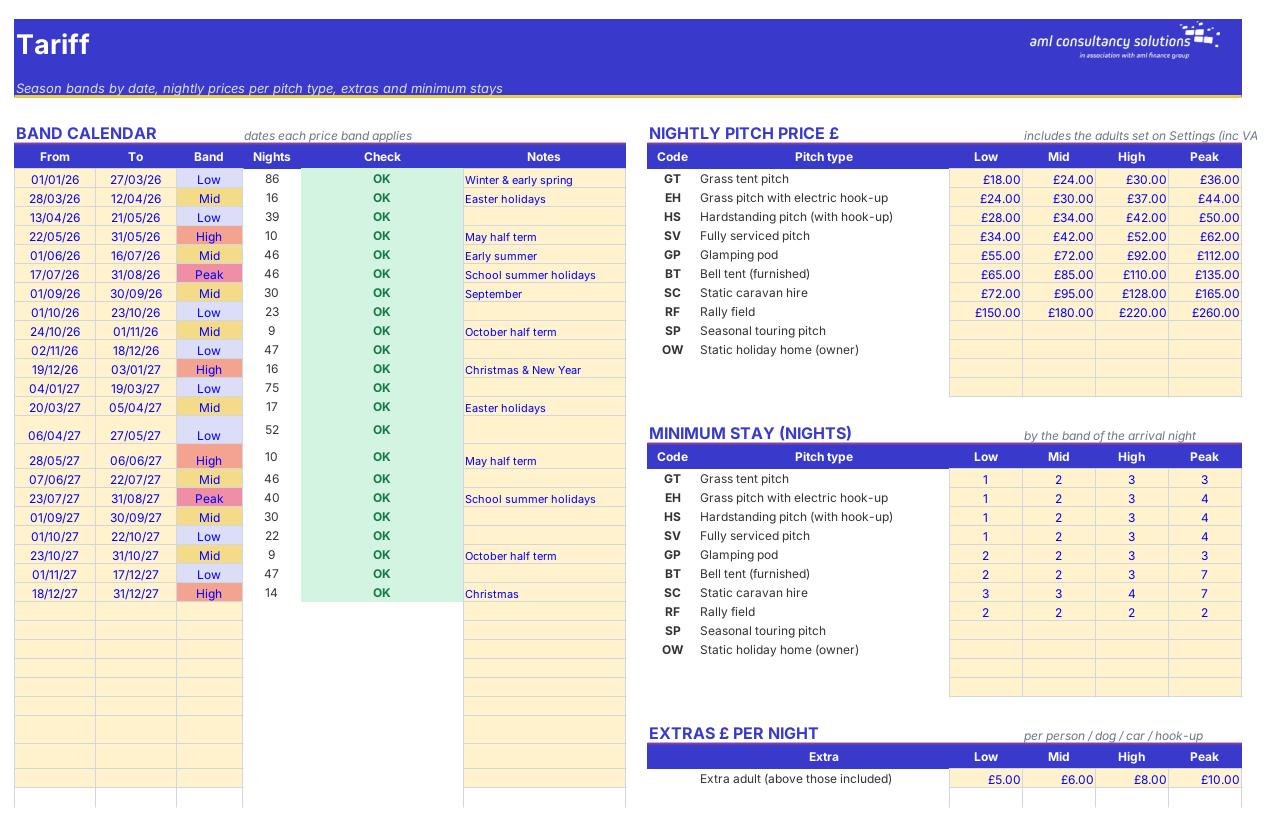
Tariff

Band calendar, nightly prices, minimum stays and extras. What you do: update before each season.

Step 3

Bookings

Every stay with its price, revenue, commission, VAT, balance due, amount still to receive and status. What you do: one line per booking.

Bookings
Owners & Seasonals

Step 4

Owners & Seasonals

Annual charges, VAT and balances for seasonal pitch holders and holiday-home owners. What you do: one line per account.

Who it is for

Made for people like you

  • Example – text
  • Touring and camping parks – Grass, hook-up, hardstanding and serviced pitches priced by band with per-person, dog, car and hook-up extras.
  • Glamping sites – Pods, bell tents and other units priced per unit per night with minimum stays.
  • Holiday parks with statics – Caravans for hire alongside privately owned holiday homes with annual pitch fees and utility recharges.
  • Parks with seasonal pitches and rallies – Seasonal pitch accounts with off-season storage, and a rally field priced per night plus per person.
  • WATCH OUT – The workbook is a management and pricing tool, not a booking system or accounting package. It doesn't take payments or file VAT returns – keep your booking software and accounts as the record, and use this to analyse, price and check.

Quick start

Up and running in minutes

  1. Example – text
  1. Settings – Enter your park name and the season year to report on. Leave the report date blank so it uses today. Say whether you're VAT registered and check the booking channels – commission % and how many days before arrival the balance is due.
  2. Pitch Types – One row per kind of pitch or unit: a short code, the name, Let as (Nightly, Seasonal or Owner), how many pitches, the pitch-number prefix, the first and last night it's open, whether per-person charges apply, how electricity is charged and the maximum party size.
  3. Tariff – Enter the dates of each price band, the nightly price for each pitch type in each band, the extras and the minimum stays. The Calendar sheet then shows the band and price for every date.
  4. Bookings – One line per booking: pitch type and number, arrival, nights, party, extras and channel. Add the deposit, payment dates and any cancellation as they happen. The price fills in by itself.
  5. Owners & Seasonals – One line per seasonal pitch holder or holiday-home owner with their licence dates, fees, recharges, meter readings and what they've paid.
  6. Read the results – Start on the Dashboard, then Occupancy, Pitch Heat Map, Revenue and VAT. Print Arrivals & Departures for reception each morning. Sort out any booking whose Status starts 'Check:'.

Key features

  • Up to 12 pitch types – tents, hook-up and hardstanding pitches, glamping, statics for hire, rally field, seasonal pitches and owners' holiday homes.
  • Band calendar (Low / Mid / High / Peak) with nightly prices, per-person, dog, car and hook-up extras and minimum stays – every booking priced night by night.
  • Bookings log for 3,500 stays with deposits, balances, cancellations, channel commission, VAT and checks for double-booked pitches and out-of-season stays.
  • Occupancy, ADR and RevPAP by type and month, a pitch-by-night heat map, arrivals & departures lists, revenue by channel and extra, owners' fees and recharges, and a VAT summary.

What’s included

  • Dashboard – Results at a glance
  • Settings – Season year, VAT and channels
  • Pitch Types – Pitches, seasons and charging
  • Tariff – Bands, prices, extras, minimum stays
  • Bookings – Every stay
  • Owners & Seasonals – Pitch fees and recharges
  • Occupancy – Occupancy, ADR and RevPAP
  • Pitch Heat Map – Pitch × night for a month
  • Arrivals & Departures – Daily reception list
  • Revenue – By channel and extra
  • VAT – Output VAT and liabilities
  • Calendar – Band and price for every date
  • Tax Rates – VAT rates and thresholds
  • Guide – How to use this workbook

How buying works

Your file is only released once payment has cleared.

1

Click Buy now

You are taken to our secure checkout.

2

Pay securely

Checkout takes a minute and you get a receipt by email.

3

Download your file

Your download link arrives as soon as payment clears.

Explore the range

Need it tailored to your business?

We can adapt any prebuilt solution or build something bespoke, with a lifetime bug-free guarantee.

Part of AML Finance Group

Need an accountant too?

Our sister firm, AML Accountancy Solutions, is an award-winning accountancy practice helping businesses and individuals across the UK with their accounts, tax, bookkeeping and payroll.

Visit AML Accountancy Solutions

