← All prebuilt solutions
Industry

Charity Funds & Gift Aid Tracker

Fund accounting, a SOFA by fund type, reserves, Gift Aid claims and GASDS for small charities, CIOs and community groups

£20

Secure checkout. Your download link is sent as soon as payment clears.

Charity Funds & Gift Aid Tracker

Overview

Charities have to keep track of more than just money in and money out. Every pound belongs to a fund – free to spend (unrestricted), set aside by the trustees (designated), tied to a purpose by the donor or funder (restricted) or held as capital (endowment) – and your accounts, annual report and reserves policy all depend on getting that right. On top of that, Gift Aid only works if you hold a valid declaration for every donor, claim within the time limit and send HMRC a correctly laid-out schedule. This workbook brings all of that together. You set up your funds and donors once, log income and spending as it happens, and it produces the fund balances, a Statement of Financial Activities (SOFA) by fund type, your free reserves against policy, every Gift Aid and GASDS figure, a schedule ready for HMRC and the figures for your trustees' annual report.

Price
£20
Who it’s for
Industry
Works with
Microsoft Excel for Windows and Mac
Buy now

See how it works

A walk through the main sheets

The sheets you will use most, in the order you will use them – shown with the sample data every workbook comes with.

Step 1

Funds

Every fund with its balances and status. What you do: enter the yellow columns.

Funds
Income

Step 2

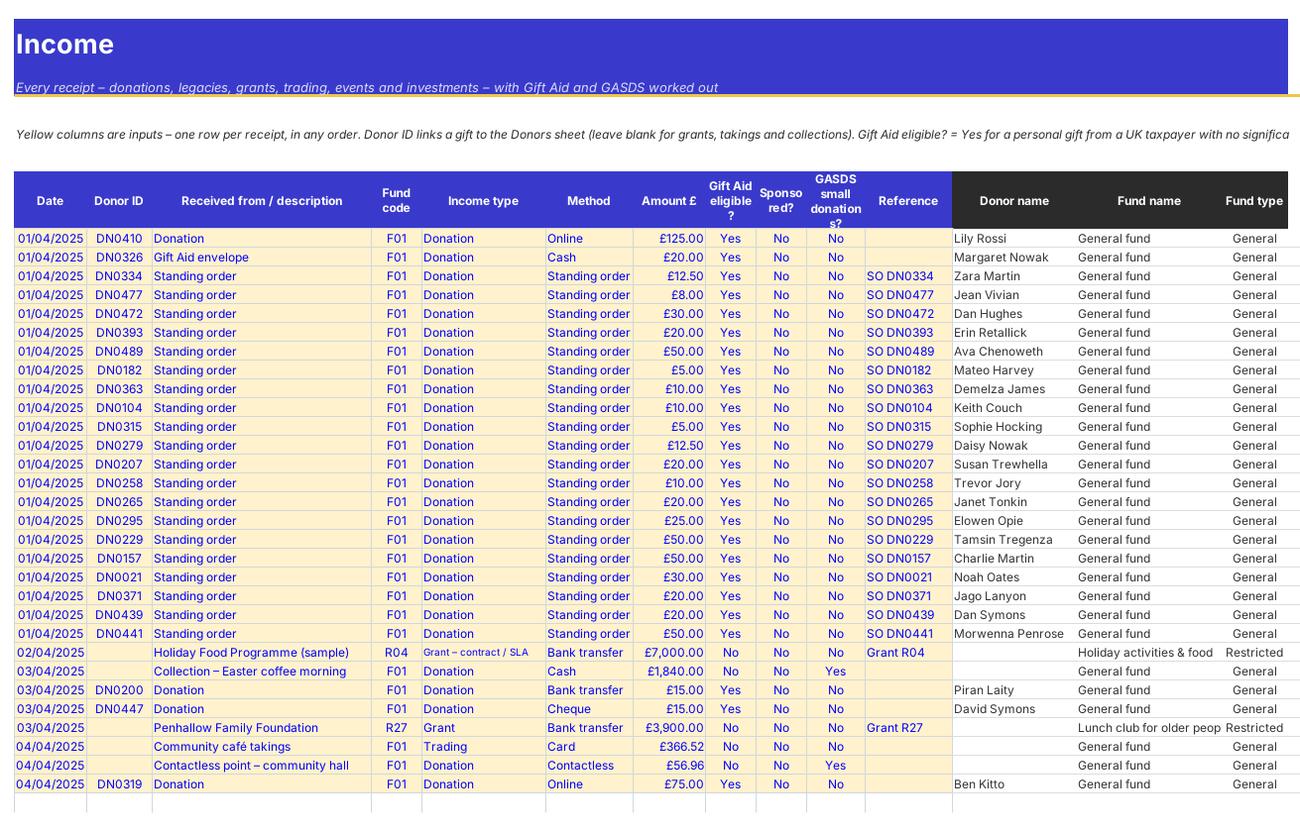
Income

Every receipt, with Gift Aid worked out on each gift. What you do: add a row for each receipt.

Step 3

Expenditure

Every payment, by fund, activity, project and category. What you do: add a row for each payment.

Expenditure
Transfers

Step 4

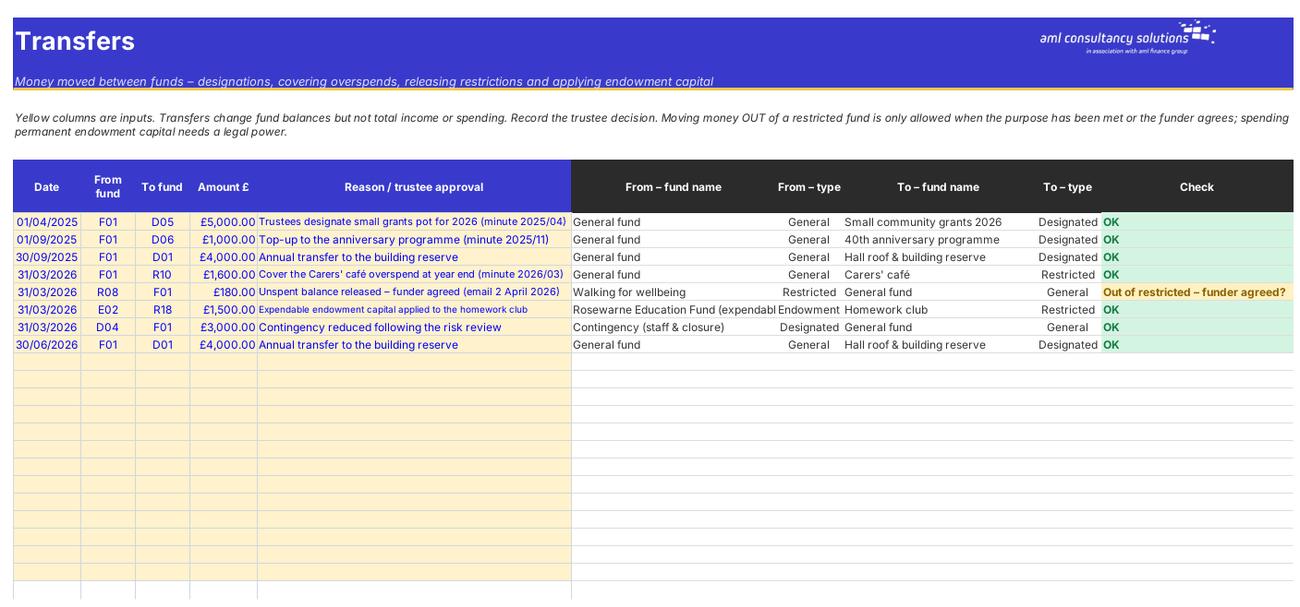
Transfers

Money moved between funds. What you do: add a row for each transfer the trustees approve.

Who it is for

Made for people like you

  • Example – text
  • Small charities and CIOs – Fund balances, a SOFA and reserves without a full accounting package.
  • Community groups, churches and village halls – A simple way to keep restricted grants separate and claim every penny of Gift Aid.
  • Treasurers and finance volunteers – One workbook that answers the trustees' questions – what's left in each grant, are we within our reserves policy, what Gift Aid is due.
  • Independent examiners and accountants – A clean, checkable record of income, spending, transfers and Gift Aid by fund.

Quick start

Up and running in minutes

  1. Example – text
  1. Settings – Enter your charity's name, number, HMRC charities reference and legal structure, the date you start tracking from, your financial year, the report date, your Gift Aid options, your reserves policy and how support costs are shared.
  2. Funds – List every fund with a short code (F01, D01, R01, E01…), its type, purpose, funder and its balance on the tracking start date. Those opening balances should add up to the money you hold on that date.
  3. Donors – Add each individual donor with their full name, house name or number, postcode and Gift Aid declaration details.
  4. Income and Expenditure – Log every receipt and payment against a fund. For gifts from donors, add the Donor ID and say whether the gift is Gift Aid eligible. For payments, choose the activity (Charitable activities, Raising funds, Support costs, Governance or Other expenditure) and a project.
  5. Transfers – Record any money the trustees move between funds – for example to cover a restricted overspend or to set up a designated fund.
  6. Gift Aid Claims – Add a row for each claim period (monthly or quarterly). Pick that claim on the Claim Schedule sheet, fix anything flagged and copy the lines into HMRC's schedule.
  7. GASDS – Check how much small-donations top-up you can claim each tax year and record what you claim.
  8. Review – Use the Dashboard, Fund Movements, SOFA, Reserves and Annual Report sheets for your trustees' meetings and year-end report.

Key features

  • A funds register (general, designated, restricted and endowment) with purposes, balances, overspend warnings, and income and expenditure logs for 4,000 rows each.
  • Fund movements, a SOFA by fund type with support and governance costs shared out, a reserves calculation against your policy, and figures for the trustees' annual report.
  • Gift Aid declarations register, eligibility checks on every gift, a claim tracker with the 4-year deadline and a schedule in HMRC's Charities Online column layout – with £20 aggregation.
  • GASDS top-up with the £8,000 limit and the 10× matching rule, Charity Commission thresholds (including the 30 September 2026 changes) and a dashboard.

What’s included

  • Dashboard – Income, spending, reserves and Gift Aid
  • Settings – Charity details, rules and lists
  • Funds – Every fund and its balance
  • Income – Every receipt
  • Expenditure – Every payment
  • Transfers – Money moved between funds
  • Donors – Gift Aid declarations register
  • Gift Aid Claims – Claim tracker and deadlines
  • Claim Schedule – HMRC schedule for one claim
  • GASDS – Small donations top-up
  • Fund Movements – Funds note by type
  • SOFA – Statement of financial activities
  • Reserves – Free reserves vs policy
  • Annual Report – Report figures and CC thresholds
  • Guide – How to use this workbook

How buying works

Your file is only released once payment has cleared.

1

Click Buy now

You are taken to our secure checkout.

2

Pay securely

Checkout takes a minute and you get a receipt by email.

3

Download your file

Your download link arrives as soon as payment clears.

Explore the range

Need it tailored to your business?

We can adapt any prebuilt solution or build something bespoke, with a lifetime bug-free guarantee.

Part of AML Finance Group

Need an accountant too?

Our sister firm, AML Accountancy Solutions, is an award-winning accountancy practice helping businesses and individuals across the UK with their accounts, tax, bookkeeping and payroll.

Visit AML Accountancy Solutions