← All prebuilt solutions
Industry

Garage & MOT Workshop Manager

For independent garages and MOT centres – every job card, technician, vehicle and pound in one place

£20

Secure checkout. Your download link is sent as soon as payment clears.
Garage & MOT Workshop Manager

Overview

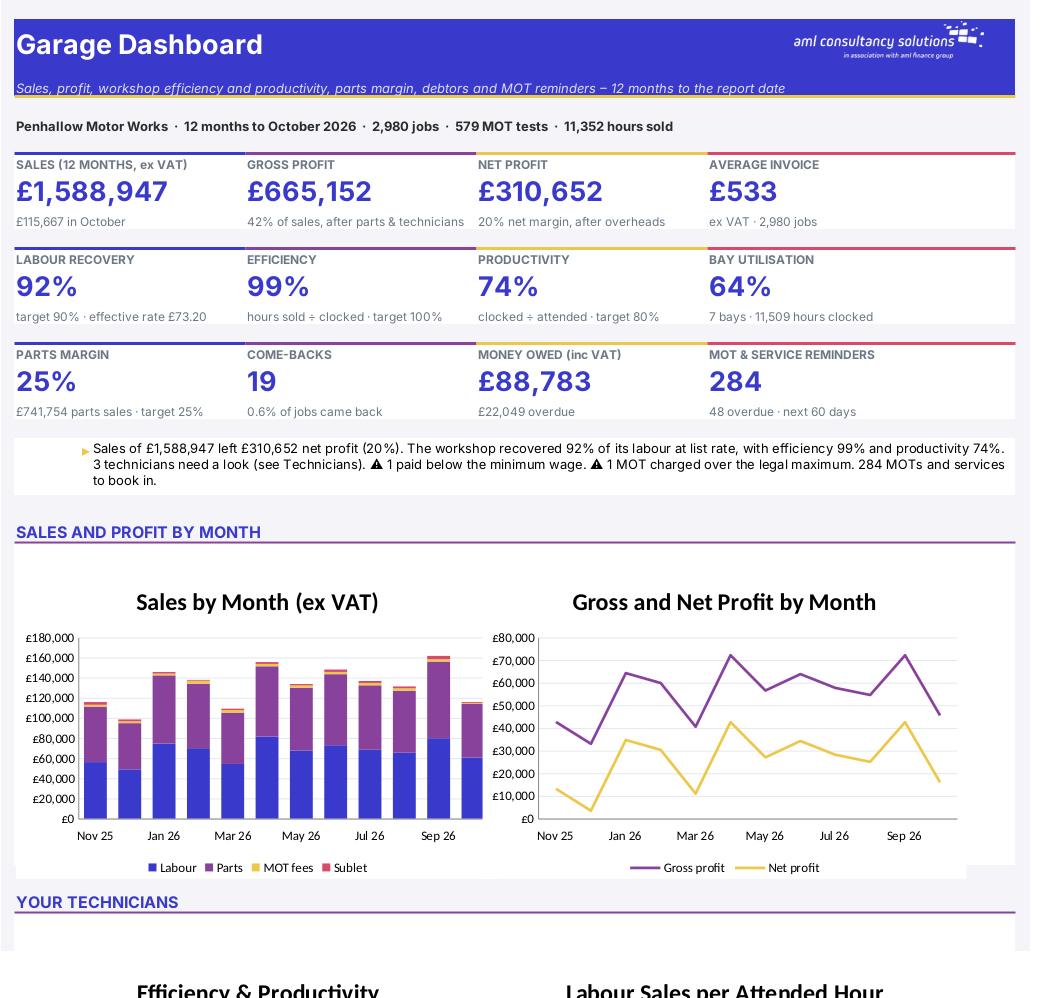
A busy workshop can look full every day and still not make the money it should. Jobs overrun the hours you charged, technicians stand waiting for parts, discounts creep in, work comes back, and account customers pay late. This workbook turns your job cards into the numbers that show where the money goes: hours sold against hours clocked (efficiency), hours clocked against hours paid (productivity), how much of your labour you actually recover at your door rate, parts margin, average invoice value, bay utilisation, come-backs, a monthly profit and loss account and aged debtors. It also keeps your customer and vehicle records, works out each vehicle's next MOT and service date from the work you've done, and gives you a reminders list to fill next month's diary.

Price
£20
Who it’s for
Industry
Works with
Microsoft Excel for Windows and Mac
Buy now

See how it works

A walk through the main sheets

The sheets you will use most, in the order you will use them – shown with the sample data every workbook comes with.

Step 1

Vehicles

Each vehicle with its owner, last and next MOT and service, days to go and a reminder flag. What you do: one line per vehicle (up to 2,000).

Vehicles
Job Cards

Step 2

Job Cards

Every job with its charges, VAT, costs, gross profit, payment status and a check. What you do: one line per job card (up to 3,500).

Step 3

Technicians

Pay check, annual cost, hours attended, clocked and sold, efficiency, productivity, labour sales per hour, come-backs and a rating. What you do: one line per person (up to 20).

Technicians
Reminders

Step 4

Reminders

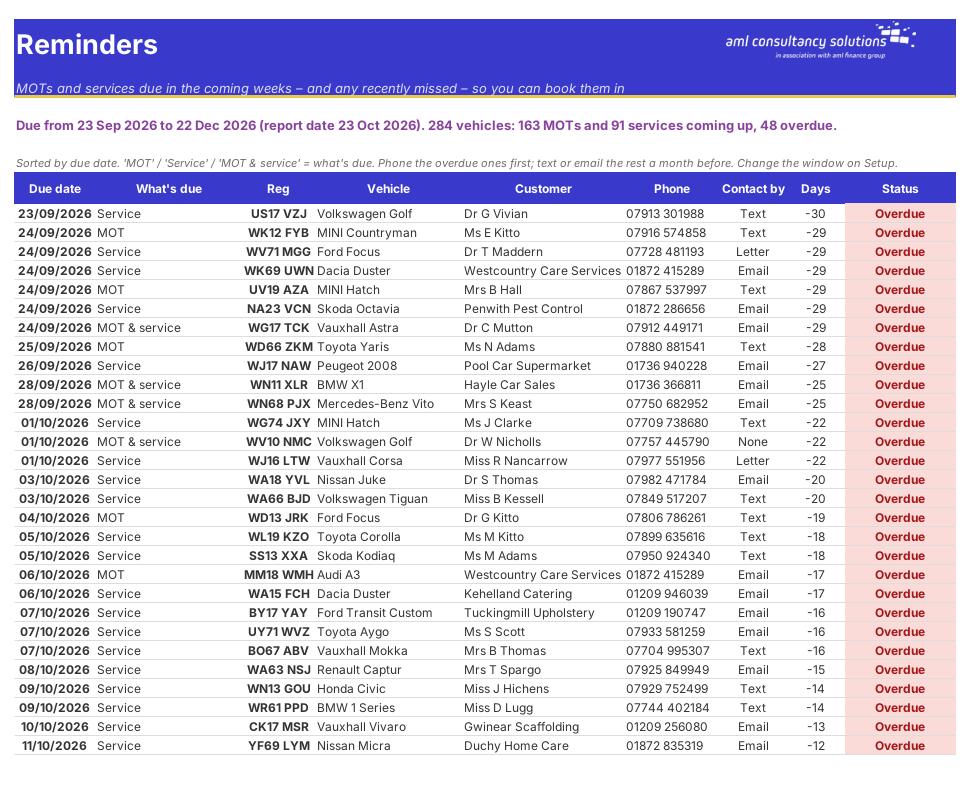
MOTs and services due in the reminder window, soonest first. What you do: nothing – work through the list.

Who it is for

Made for people like you

  • Example – text
  • Independent garages and MOT centres – Job cards for MOT, service, repair, diagnostic and tyre work, with labour, parts, sublet, MOT fee and VAT on every job.
  • Workshop owners and managers – Efficiency, productivity, labour recovery and come-backs for each technician – the figures franchised dealers live by.
  • Fast-fit, tyre and service centres – Tyre and service jobs priced at their own labour rate and parts markup, and a monthly view of what each type of job earns.
  • Garages with fleet and trade accounts – Customer labour rates and payment terms, aged debt and a list of who to chase first.

Quick start

Up and running in minutes

  1. Example – text
  1. Setup – your garage – Enter your business name, tax year, report date (normally today), whether you're VAT registered, whether you claim the Employment Allowance and your default payment terms.
  2. Setup – rates and targets – Enter your standard labour rate, parts and sublet markup, and your targets for labour recovery, efficiency, productivity and parts margin. Add holiday weeks and other on-costs per technician.
  3. Setup – workshop, MOT fees, job types, overheads – Enter your bays and opening hours, the reminder window, your MOT fees for each class, the job types you use and your annual overheads.
  4. Technicians – List each person who works on vehicles: role, MOT tester, pay age band, hourly rate, hours a week, start date and absence days.
  5. Customers and Vehicles – Add each customer (with terms and any agreed labour rate for accounts) and each vehicle with its MOT expiry and last service date.
  6. Log every job card – One line per job card: date, reg, job type, technician, hours sold and clocked, parts cost, and anything that differs from the usual rate, markup or fee. Mark it paid when the money arrives.
  7. Book the reminders – Each week, work through the Reminders sheet – phone the overdue ones, text or email the rest.
  8. Review the numbers – Each month, read the Dashboard, Monthly P&L, Technicians and Debtors sheets and act on anything red.

Key features

  • Job cards for 3,500 jobs – MOT, service, repair, diagnostic and tyres – with hours sold v clocked, labour, parts at markup, sublet, the MOT fee (checked against the legal maximum), VAT and gross profit on every job.
  • Customer and vehicle records with next MOT and service due dates worked out from your job cards, and a reminders list of everything due in the next 60 days (and recently missed).
  • Technicians' efficiency, productivity, labour sales per hour, come-backs and true cost, with a minimum wage check – plus labour recovery, parts margin, average invoice and bay utilisation.
  • Monthly P&L, aged debtors, analysis by job type, customer type and make, and a dashboard with the numbers that matter.

What’s included

  • Dashboard – The garage at a glance
  • Setup – Rates, MOT fees, job types, overheads
  • Customers – Accounts, sales and money owed
  • Vehicles – MOT and service due dates
  • Job Cards – Every job
  • Technicians – Efficiency, productivity, cost
  • Reminders – MOTs and services to book
  • Debtors – Aged debt, largest first
  • Monthly P&L – Profit and workshop KPIs by month
  • Sales Analysis – By job type, customer type, make
  • Tax Rates – NI, minimum wage, pension
  • Guide – How to use this workbook

How buying works

Your file is only released once payment has cleared.

1

Click Buy now

You are taken to our secure checkout.

2

Pay securely

Checkout takes a minute and you get a receipt by email.

3

Download your file

Your download link arrives as soon as payment clears.

Explore the range

Need it tailored to your business?

We can adapt any prebuilt solution or build something bespoke, with a lifetime bug-free guarantee.

Part of AML Finance Group

Need an accountant too?

Our sister firm, AML Accountancy Solutions, is an award-winning accountancy practice helping businesses and individuals across the UK with their accounts, tax, bookkeeping and payroll.

Visit AML Accountancy Solutions

