← All prebuilt solutions
Industry

Grant Funding Tracker

Grants, budgets, eligible spend, claims, match funding, outputs, deadlines and the pipeline – for businesses, charities and community groups

£20

Secure checkout. Your download link is sent as soon as payment clears.

Grant Funding Tracker

Overview

Grant money comes with strings attached: an approved budget split into cost categories, rules about what's eligible (including VAT), claims to make on time with evidence, match funding to show, outputs to deliver and, if things go wrong, money to pay back. Most organisations juggle several grants from different funders, each with its own timetable. This workbook keeps every grant in one place. You enter each grant and its budget once, log costs as they happen, and it works out what's eligible and claimable, what each claim should be, what the funders owe you, whether you're within the budget tolerances, how much match funding you still need, how your outputs are doing and what's due next – plus a weighted pipeline of applications in progress.

Price
£20
Who it’s for
Industry
Works with
Microsoft Excel for Windows and Mac
Buy now

See how it works

A walk through the main sheets

The sheets you will use most, in the order you will use them – shown with the sample data every workbook comes with.

Step 1

Grants

The register – terms, conditions and progress for each grant. What you do: enter the yellow columns.
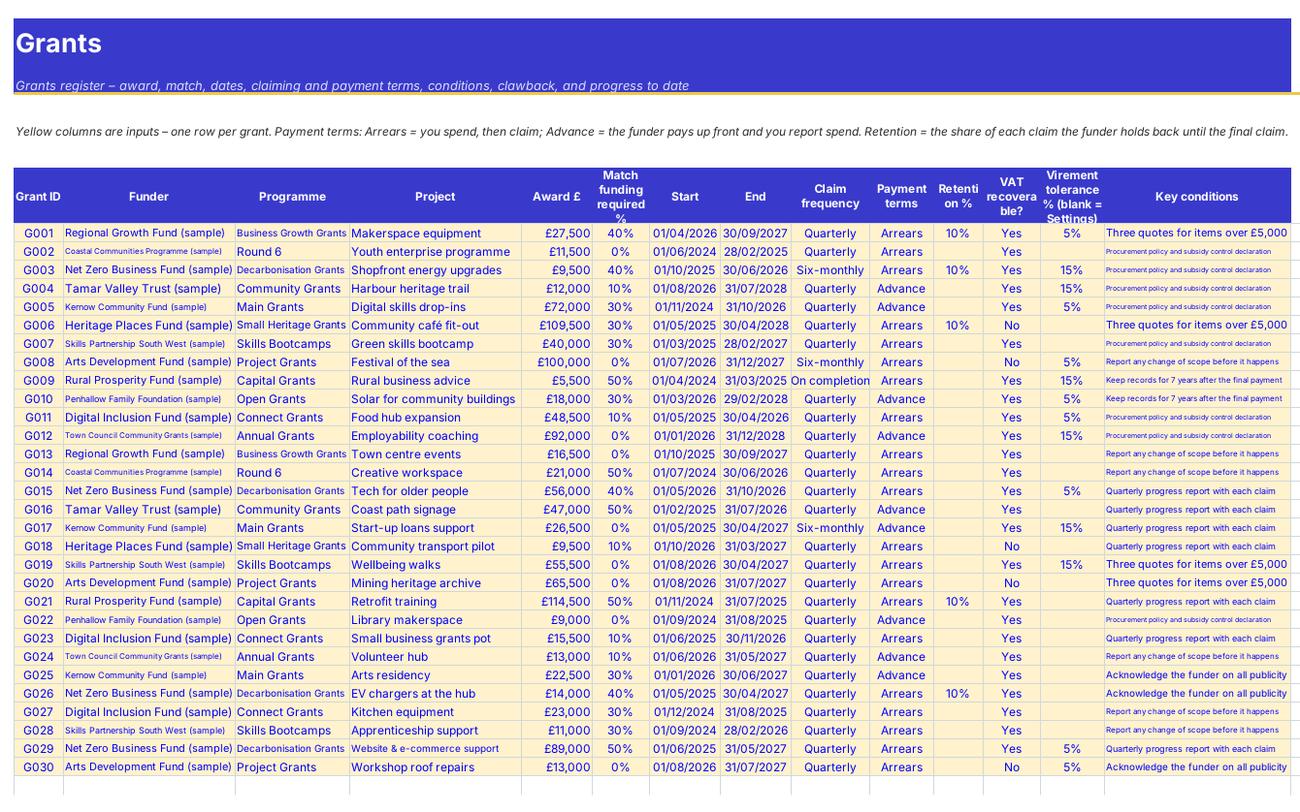
Grants
Budget vs Actual

Step 2

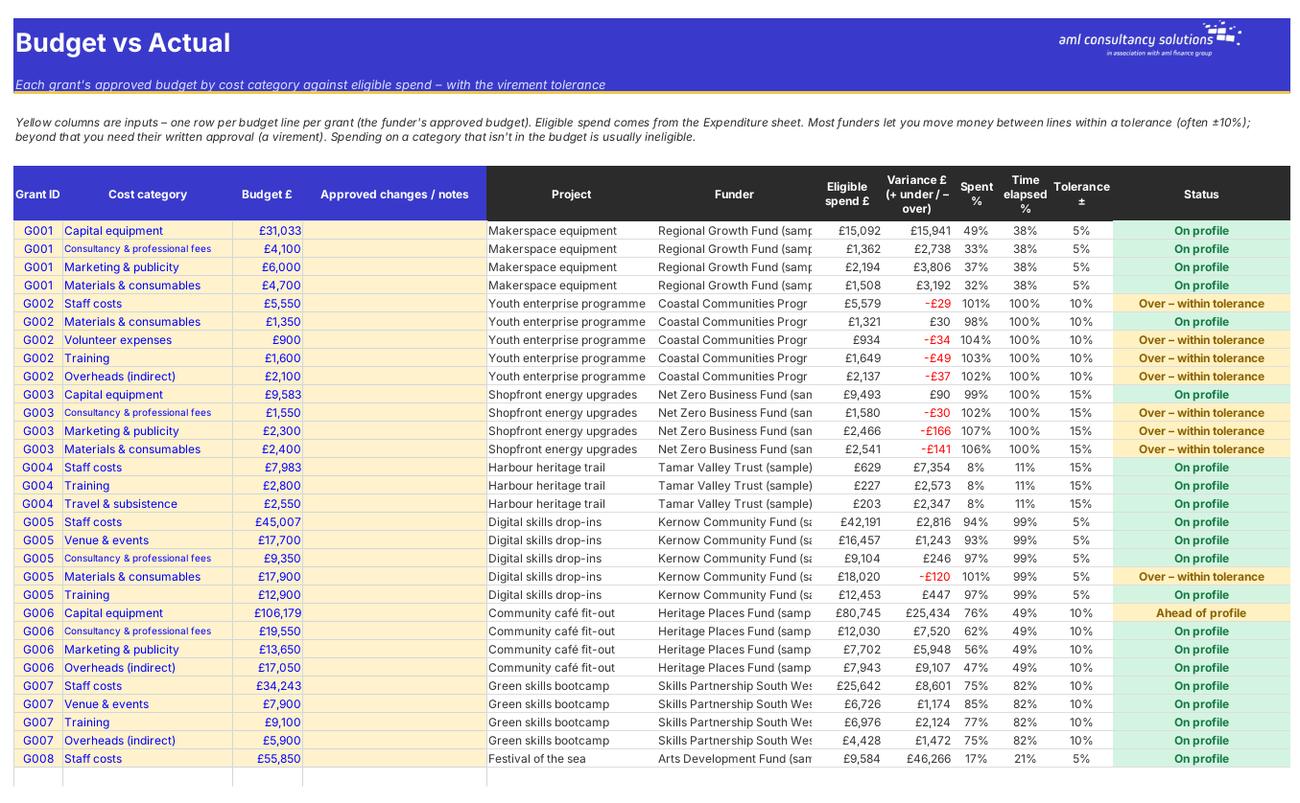
Budget vs Actual

Each grant's budget by category against eligible spend. What you do: enter the budget lines.

Step 3

Expenditure

Every cost, with eligibility, claimable amount and claim. What you do: add a row for each invoice or payroll cost.
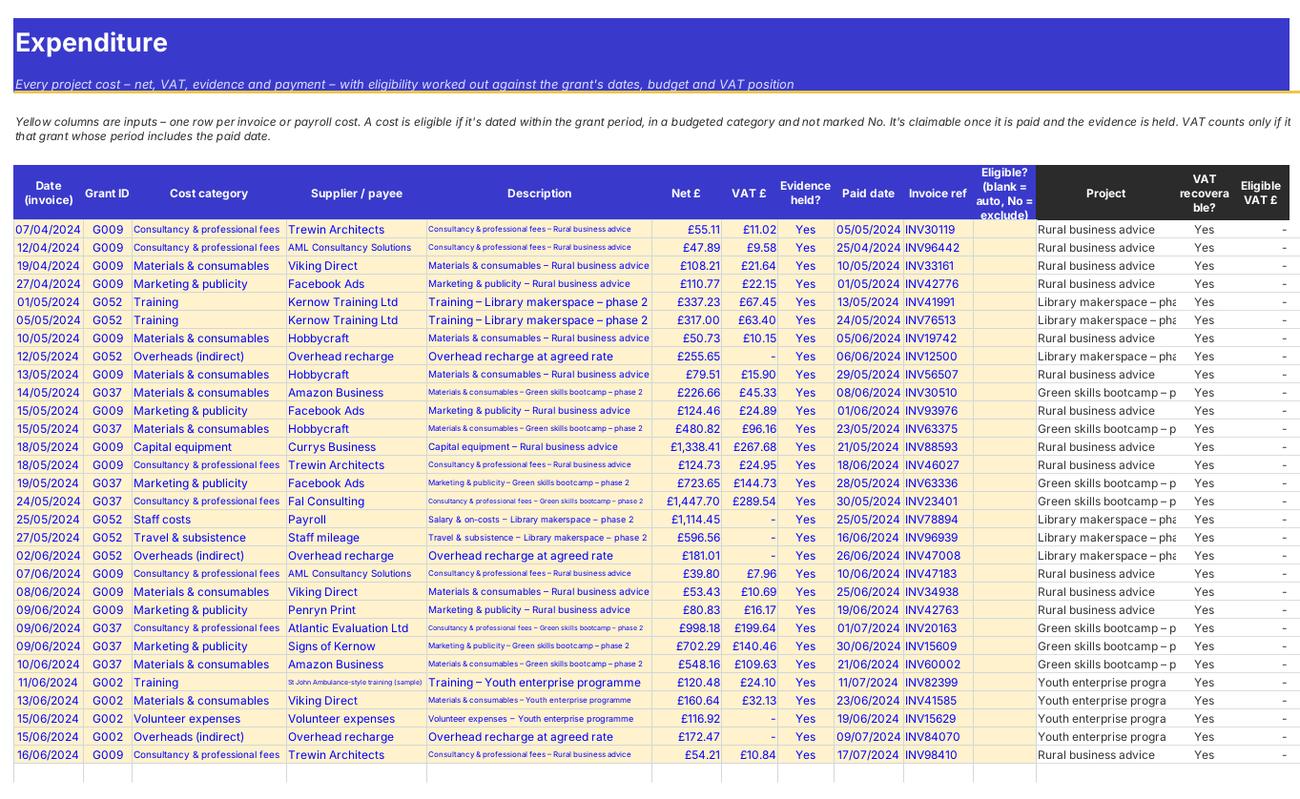
Expenditure
Claims

Step 4

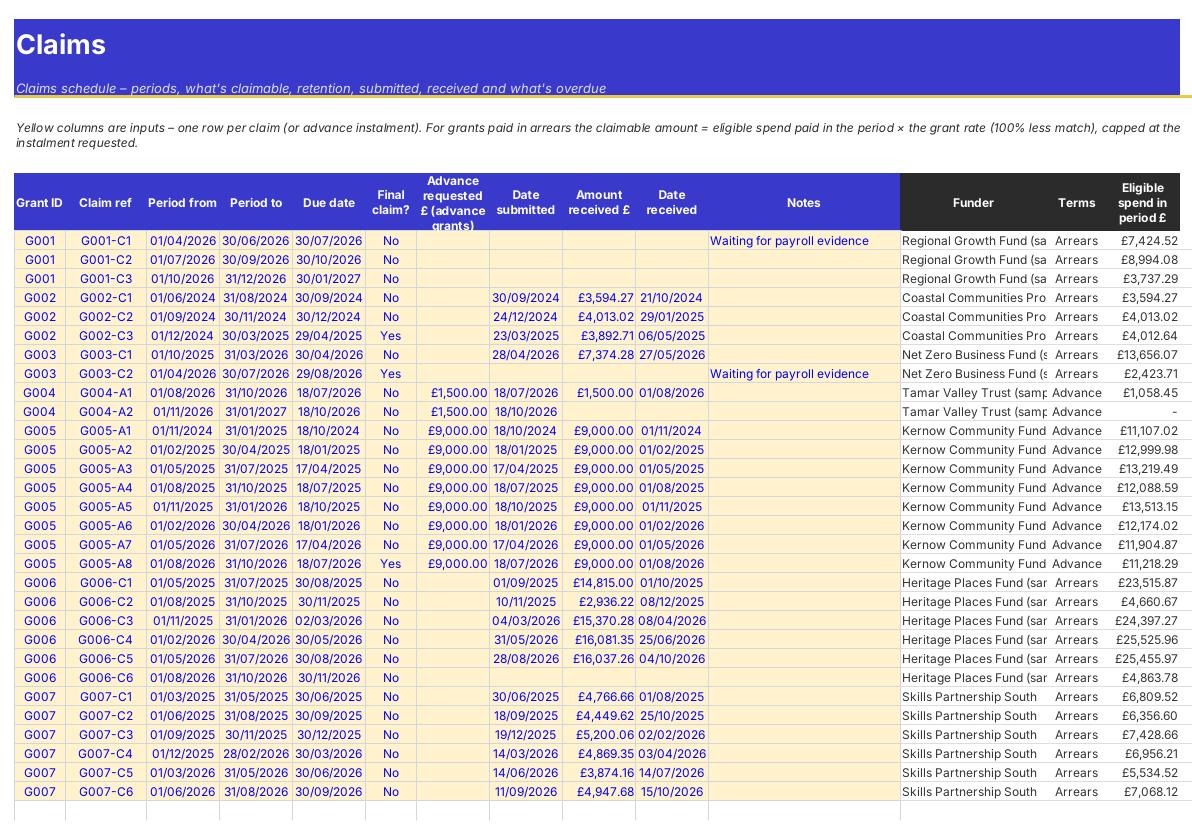
Claims

Claim periods, amounts, retention, submission and payment. What you do: add claim periods; record submitted and received.

Who it is for

Made for people like you

  • Example – text
  • Small businesses with growth, net zero or capital grants – Claims worked out from paid, evidenced costs, with VAT handled and retention tracked.
  • Charities and community groups – Every grant's budget, match funding and outputs in one place, and a deadlines calendar for the trustees.
  • Grant and finance managers – A claims schedule, what's owed by each funder and a list of everything that needs attention.
  • Bid writers and fundraisers – A pipeline with deadlines, probabilities and the weighted value of applications.

Quick start

Up and running in minutes

  1. Example – text
  1. Settings – Enter your organisation name and the report date, check the default virement tolerance, warning windows and pipeline probabilities, and list your funders.
  2. Grants – Add each grant from its offer letter: funder, programme, project, award, match %, start and end dates, claim frequency, payment terms, retention, whether you can recover VAT, any special tolerance, key conditions and clawback rules.
  3. Budget vs Actual – Enter the approved budget for each grant, one row per cost category. Budget lines are the full project cost (grant plus match).
  4. Expenditure – Log every cost charged to a grant – invoice date, category, supplier, net, VAT, whether you hold the evidence and the date you paid it.
  5. Claims – Add the claim periods for each grant with their due dates. The sheet works out what to claim. Record when you submit and what the funder pays.
  6. Match Funding and Outputs – Record match contributions and update outputs with each claim or progress report.
  7. Pipeline – Track applications you're working on – deadline, amount, status and probability.
  8. Review – Use the Dashboard and Deadlines sheets every week, and the Grants status column to see what needs attention.

Key features

  • A grants register for up to 80 grants – award, match %, dates, claim frequency, arrears or advance payment, retention, VAT position, conditions and clawback rules.
  • Budget vs actual for every grant by cost category with a virement tolerance, and a 4,000-row expenditure log that works out eligible and claimable costs, including VAT.
  • A claims schedule with retention, amounts received and differences, plus match funding, outputs and KPIs against targets.
  • A deadlines calendar for claims, reports, grant ends, output targets, clawback periods and applications, a weighted applications pipeline and a dashboard.

What’s included

  • Dashboard – Grants, claims, match, outputs and deadlines
  • Settings – Rules, funders and lists
  • Grants – Grants register
  • Budget vs Actual – Budget lines and virements
  • Expenditure – Every project cost
  • Claims – Claims and payments
  • Match Funding – Cash and in-kind match
  • Outputs – KPIs against targets
  • Pipeline – Applications in progress
  • Deadlines – Everything due, in date order
  • Guide – How to use this workbook

How buying works

Your file is only released once payment has cleared.

1

Click Buy now

You are taken to our secure checkout.

2

Pay securely

Checkout takes a minute and you get a receipt by email.

3

Download your file

Your download link arrives as soon as payment clears.

Explore the range

Need it tailored to your business?

We can adapt any prebuilt solution or build something bespoke, with a lifetime bug-free guarantee.

Part of AML Finance Group

Need an accountant too?

Our sister firm, AML Accountancy Solutions, is an award-winning accountancy practice helping businesses and individuals across the UK with their accounts, tax, bookkeeping and payroll.

Visit AML Accountancy Solutions

