← All prebuilt solutions
Personal Finance

Household Budget

Plan every pound, track what you really spend, and build a cushion for the future

£20

Secure checkout. Your download link is sent as soon as payment clears.

Household Budget

Overview

Most households have a rough idea of what comes in and what goes out – but the irregular bills, the 'little' spends and the months when everything lands at once are what cause the stress. This workbook gives you a complete picture of your money for a whole year. It works out your take-home pay, lists everything you plan to spend and save, places each bill in the month it's actually paid, and then compares your real spending against the plan with simple traffic lights. Alongside that it checks the balance between needs, wants and savings, tells you how much to put aside each month for annual bills, tracks your emergency fund and savings goals, and audits your subscriptions.

Price
£20
Who it’s for
Personal Finance
Works with
Microsoft Excel for Windows and Mac
Buy now

See how it works

A walk through the main sheets

The sheets you will use most, in the order you will use them – shown with the sample data every workbook comes with.

Step 1

Income

Take-home pay calculation, Child Benefit and charge, other income, and total income month by month. What you do: enter each earner's details and any other income.
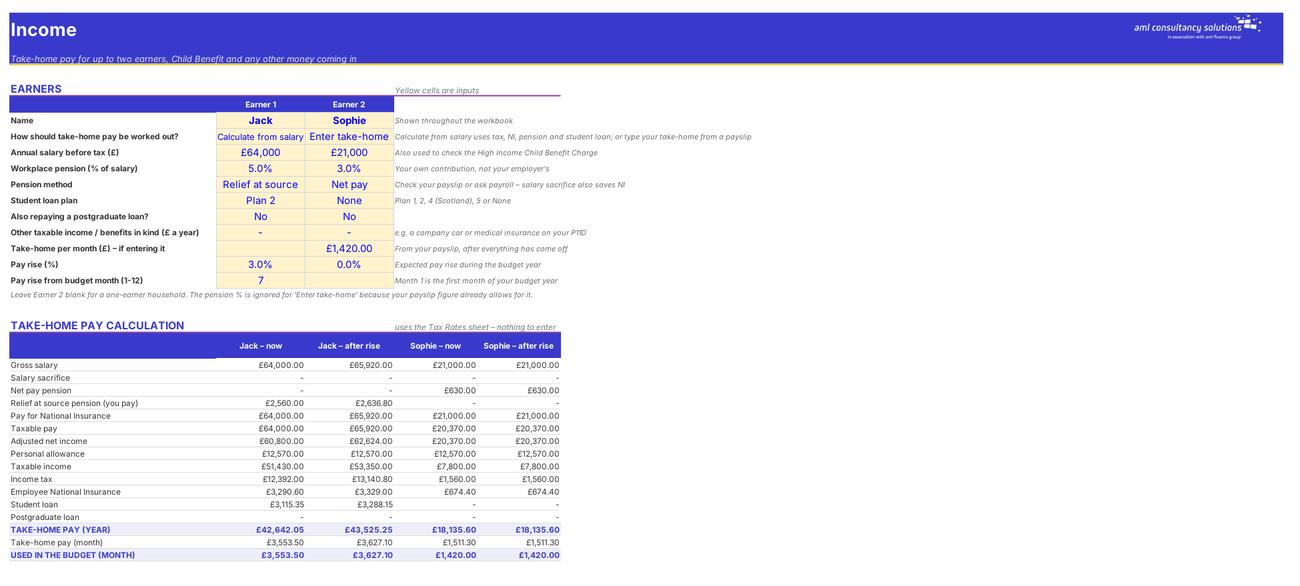
Income
Budget

Step 2

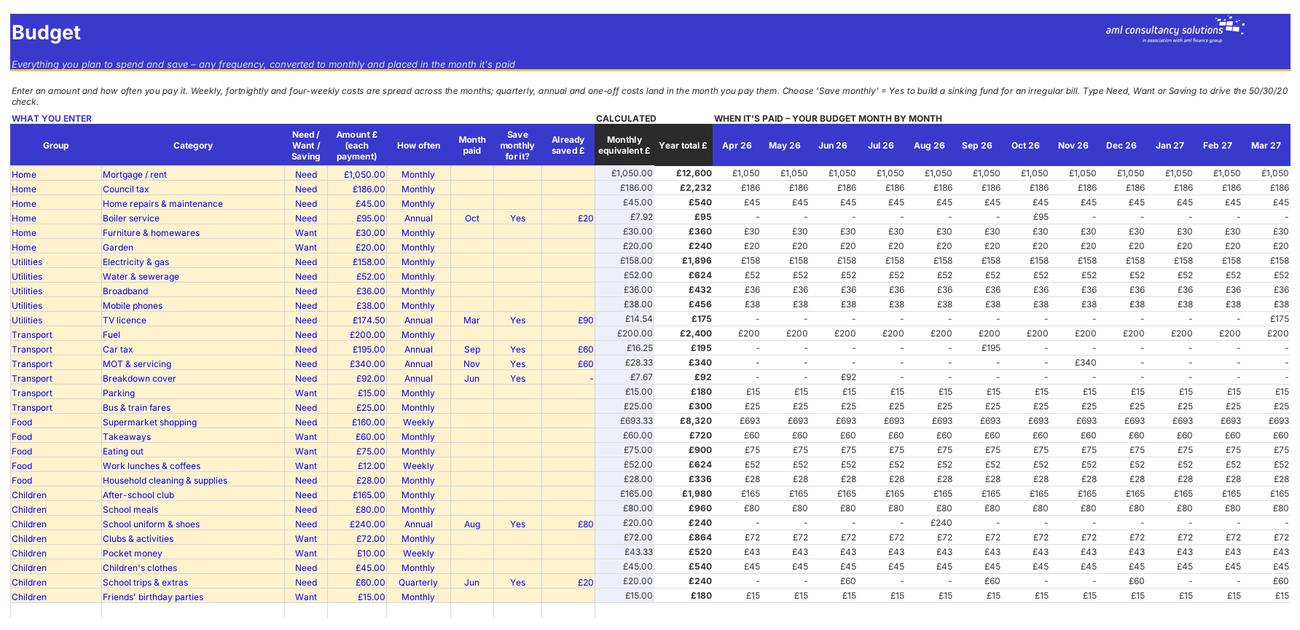
Budget

Every category with its amount, frequency, monthly equivalent and the amount that falls in each month. What you do: enter amounts, frequencies, months paid and Need/Want/Saving.

Step 3

Spending Log

Your actual spending, one line per transaction (1,500 rows). What you do: add your spending as you go.
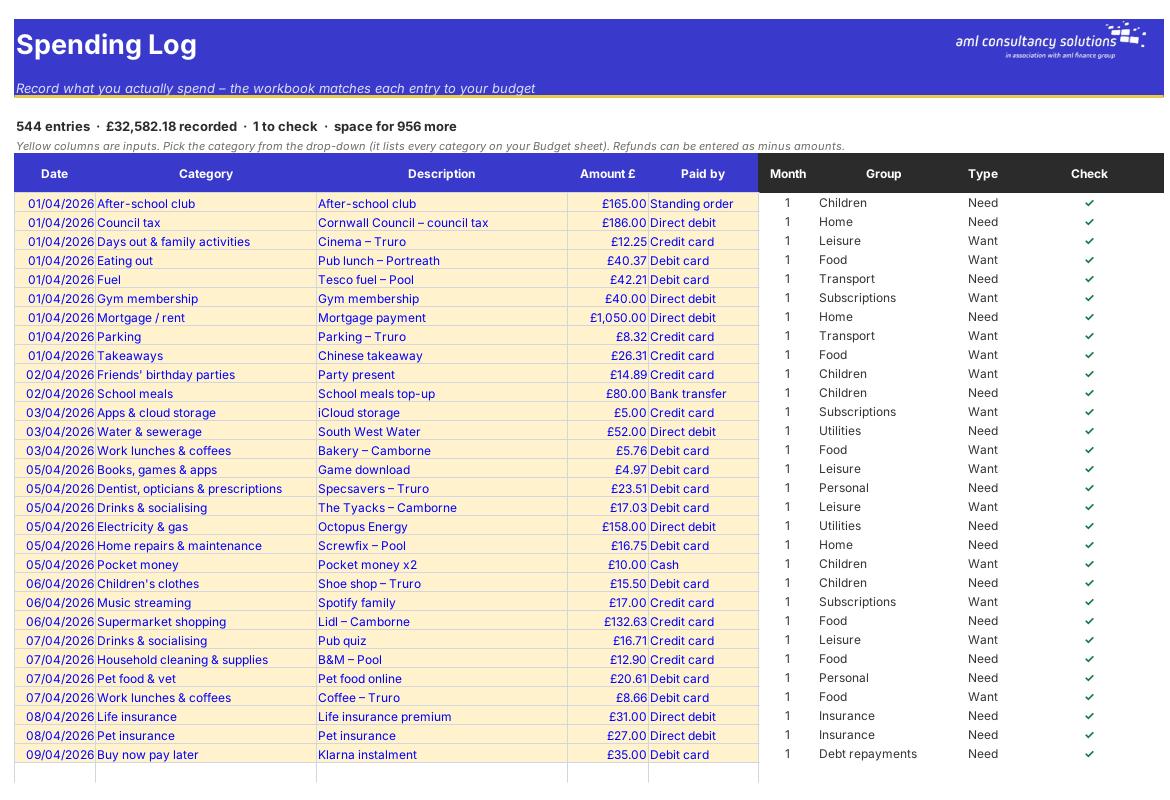
Spending Log
Actual by Month

Step 4

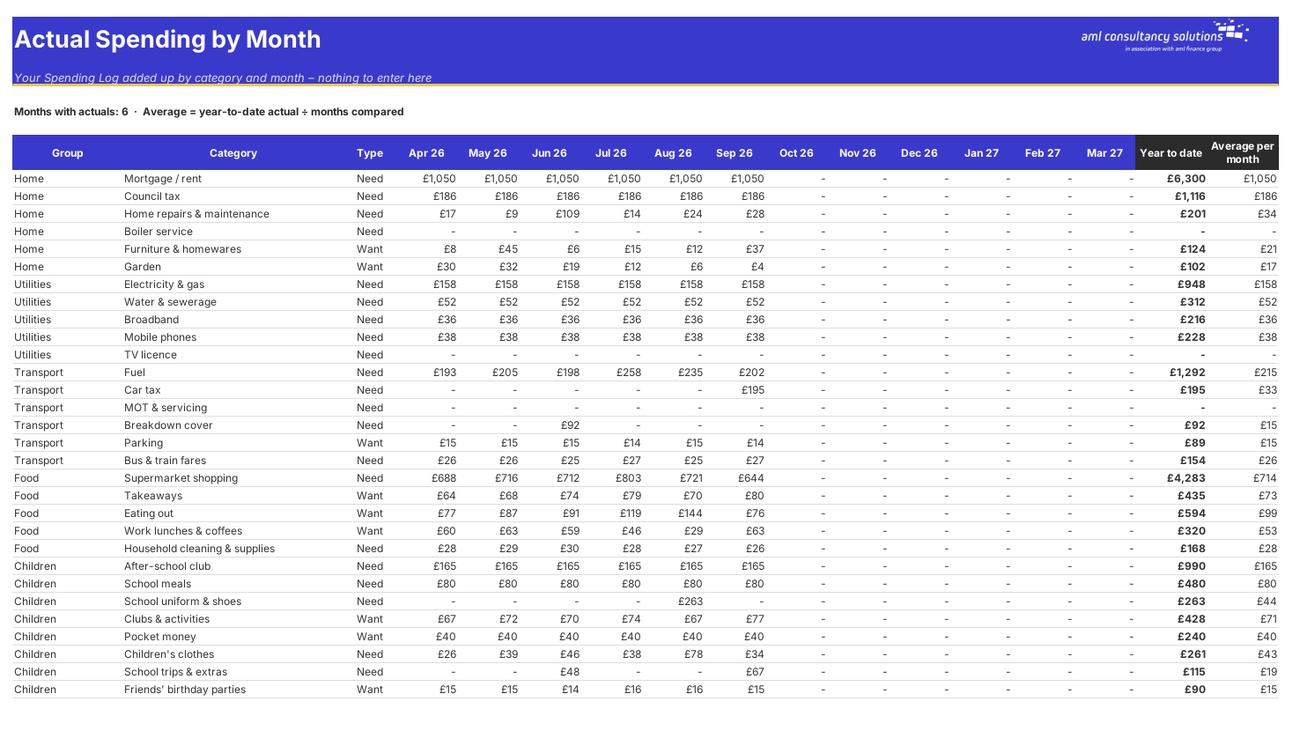
Actual by Month

The log added up by category and by group for each month. What you do: nothing to enter.

Who it is for

Made for people like you

  • Example – text
  • Couples and families – Two earners' take-home pay, Child Benefit, children's costs and a shared view of the household budget.
  • Single people and sharers – Leave the second earner blank – everything else works the same.
  • Anyone trying to save more – A 50/30/20 check, a savings rate and a list of the biggest 'wants' to trim.
  • Anyone caught out by big bills – Sinking funds that spread annual and quarterly bills into a steady monthly amount.

Quick start

Up and running in minutes

  1. Example – text
  1. Setup – Type your household name, choose the first month of your budget year (April lines up with the tax year, January with the calendar year), pick the tax year and set your targets.
  2. Income – For each earner choose 'Calculate from salary' and enter the salary, pension and student loan details – or choose 'Enter take-home' and type the monthly figure from a payslip. Add Child Benefit and any other income.
  3. Budget – Work down the categories typing the amount, how often you pay it and (for irregular bills) the month it's paid. Mark each line Need, Want or Saving. Rename or add categories in the blank rows.
  4. Check the Dashboard – See what's left over each month, your tightest month, your savings rate and the 50/30/20 split. If the plan doesn't balance, trim the biggest wants on the Needs, Wants & Savings sheet.
  5. Set up your pots – Use the Sinking Funds sheet to set up a 'bills pot' savings account and a standing order for the monthly set-aside, and the Emergency & Goals sheet for your safety net.
  6. Log your spending – Each week, add what you've spent to the Spending Log – date, category, description, amount and how you paid. Ten minutes a week is plenty.
  7. Review monthly – At the end of each month look at Budget vs Actual and the Dashboard. Red lines need action; amber lines need watching.

Key features

  • Take-home pay for up to two earners worked out from salary (tax, NI, pension and student loan) or typed from a payslip – plus Child Benefit and the High Income Child Benefit Charge.
  • Around 60 ready-made spending categories in 13 groups, any frequency from weekly to one-off, converted to monthly and placed in the month each bill is paid.
  • A 1,500-row spending log with budget vs actual traffic lights by month and year to date, plus a month-by-month cash flow and bank balance.
  • 50/30/20 needs-wants-savings check, sinking funds for annual bills, emergency fund tracker, savings goals and a subscriptions audit.

What’s included

  • Dashboard – Your budget at a glance
  • Setup – Household, start month and targets
  • Income – Take-home pay and other income
  • Budget – Everything you plan to spend and save
  • Spending Log – What you actually spend
  • Actual by Month – Your log added up
  • Budget vs Actual – Traffic lights by month and year
  • Cash Flow – Money in, money out, bank balance
  • Needs, Wants & Savings – Needs, wants and savings
  • Sinking Funds – Saving for irregular bills
  • Emergency & Goals – Your safety net and savings goals
  • Subscriptions – What you pay for every month
  • Tax Rates – UK rates used for take-home pay
  • Guide – How to use this workbook

How buying works

Your file is only released once payment has cleared.

1

Click Buy now

You are taken to our secure checkout.

2

Pay securely

Checkout takes a minute and you get a receipt by email.

3

Download your file

Your download link arrives as soon as payment clears.

Explore the range

Need it tailored to your business?

We can adapt any prebuilt solution or build something bespoke, with a lifetime bug-free guarantee.

Part of AML Finance Group

Need an accountant too?

Our sister firm, AML Accountancy Solutions, is an award-winning accountancy practice helping businesses and individuals across the UK with their accounts, tax, bookkeeping and payroll.

Visit AML Accountancy Solutions

