← All prebuilt solutions
Lite & Free

Job & Project Costing – Lite

Quote vs actual for up to 50 jobs – costs by type, forecast margins and traffic lights

£5

Secure checkout. Your download link is sent as soon as payment clears.

Job & Project Costing – Lite

Overview

Most trades and project businesses know what they quoted, but often don't find out whether a job made that margin until it's finished – or until the bank balance tells them. This workbook keeps your quotes and every cost booked to each job in one place. For every job it shows what was quoted, what has been spent so far by cost type, what the job is likely to cost by the end, the margin it will really make, and a red / amber / green traffic light. A one-page job report and a dashboard show where to look first.

Price
£5
Who it’s for
Lite & Free
Works with
Microsoft Excel for Windows and Mac
Buy now

See how it works

A walk through the main sheets

The sheets you will use most, in the order you will use them – shown with the sample data every workbook comes with.

Step 1

Jobs

The quotes and jobs register with budget cost and quoted margin. What you do: one row per quote.

Jobs
Actual Costs

Step 2

Actual Costs

Every cost booked to a job. What you do: add rows as costs come in.

Step 3

Job Margins

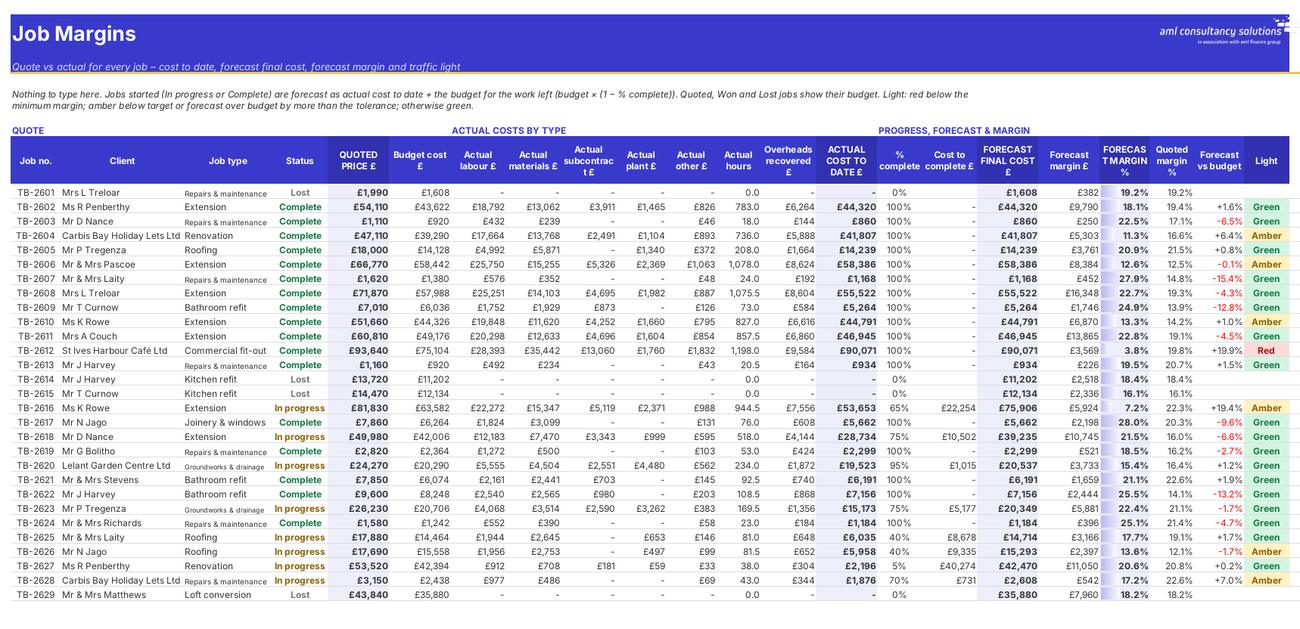
Every job's actual cost by type, forecast and margin, with a traffic light. What you do: nothing – use the filter arrows to explore.
Job Margins
Job Report

Step 4

Job Report

One job in detail: quote vs actual by cost type, margin, labour hours and a chart. What you do: pick a job number.

Who it is for

Made for people like you

  • Example – text
  • What the Lite version covers – Details
  • Jobs register – Up to 50 quotes and jobs: client, site, job type, dates, status, quoted labour hours, materials, subcontract, plant hire and other costs, and the price you quoted.
  • Budget and quoted margin – Labour is costed at your average labour rate, overheads are recovered per labour hour, and the workbook works out the budget cost and quoted margin for every job.
  • Actual costs – Up to 1,000 lines – timesheets, supplier invoices, subcontractors, plant hire and other costs. Labour is costed from hours automatically, and lines with an unknown job number are flagged.
  • Job Margins – Actual cost by type, % complete, forecast final cost, forecast margin and a traffic light for every job.
  • Job Report and Dashboard – Quote vs actual by cost type for any job, plus pipeline, win rate, margins, overruns and monthly costs for the business.

Quick start

Up and running in minutes

  1. Example – text
  1. Settings – Enter your business name and report date, your average labour cost per hour, your overhead recovery per labour hour and the traffic-light rules. Rename the job types to suit your trade.
  2. Jobs – Click 'Clear sample data', then add one row per quote: job number, client, site, type, quote date, status, quoted labour hours, the other costs you allowed for and the price you quoted.
  3. Actual Costs – Book every timesheet and supplier invoice to a job number as it comes in. For labour just enter the hours – the cost is worked out for you.
  4. Keep status and % complete up to date – Move jobs from Quoted to Won (or Lost), In progress and Complete, and update % complete for jobs in progress at least once a month.
  5. Read the results – Job Margins for every job, Job Report for one job in detail, Dashboard for the whole business.

Key features

  • Jobs register for up to 50 quotes and jobs: quoted labour hours, materials, subcontract, plant and other costs, overheads, budget cost and quoted margin.
  • Actual costs log for up to 1,000 timesheet and invoice lines – labour costed automatically from hours, with checks for unknown job numbers.
  • Job Margins: actual cost by type, forecast final cost and forecast margin for every job, with red / amber / green traffic lights.
  • A one-page job report (quote vs actual by cost type) and a dashboard of pipeline, win rate, margins on jobs started, overruns and monthly costs.

What’s included

  • Dashboard – Your jobs at a glance
  • Settings – Rates, overheads and traffic-light rules
  • Jobs – Quotes and jobs register
  • Actual Costs – Timesheets and supplier invoices
  • Job Margins – Every job's cost, forecast and margin
  • Job Report – One job in detail
  • Guide – How to use this workbook

How buying works

Your file is only released once payment has cleared.

1

Click Buy now

You are taken to our secure checkout.

2

Pay securely

Checkout takes a minute and you get a receipt by email.

3

Download your file

Your download link arrives as soon as payment clears.

Explore the range

Need it tailored to your business?

We can adapt any prebuilt solution or build something bespoke, with a lifetime bug-free guarantee.

Part of AML Finance Group

Need an accountant too?

Our sister firm, AML Accountancy Solutions, is an award-winning accountancy practice helping businesses and individuals across the UK with their accounts, tax, bookkeeping and payroll.

Visit AML Accountancy Solutions

