← All prebuilt solutions
Planning & Finance

Marketing ROI Tracker

See what every channel and campaign really returns – and where to spend next

£20

Secure checkout. Your download link is sent as soon as payment clears.
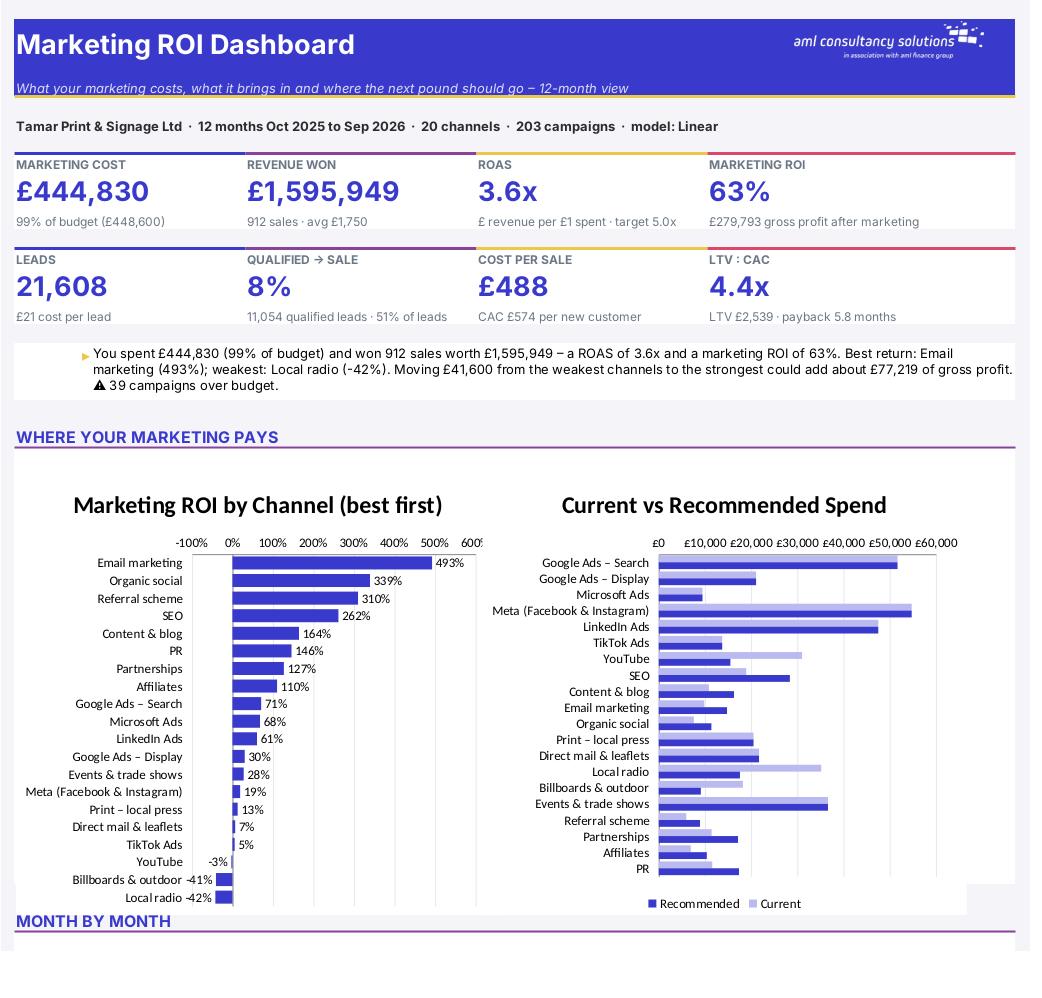
Marketing ROI Tracker

Overview

Most businesses know roughly what they spend on marketing but not what each pound brings back. Ad platforms each claim the credit for the same sale, offline activity like radio, print and events is hard to measure, and the cheapest leads are not always the ones that turn into profitable customers. This workbook brings every channel and campaign into one place – costs, the full lead funnel, sales, revenue and gross profit – and turns it into the measures that matter: cost per lead and per sale, return on ad spend (ROAS), marketing ROI on gross profit, customer lifetime value (LTV), LTV:CAC and payback. It then recommends how to move budget from your weakest channels to your strongest, within limits you set.

Price
£20
Who it’s for
Planning & Finance
Works with
Microsoft Excel for Windows and Mac
Buy now

See how it works

A walk through the main sheets

The sheets you will use most, in the order you will use them – shown with the sample data every workbook comes with.

Step 1

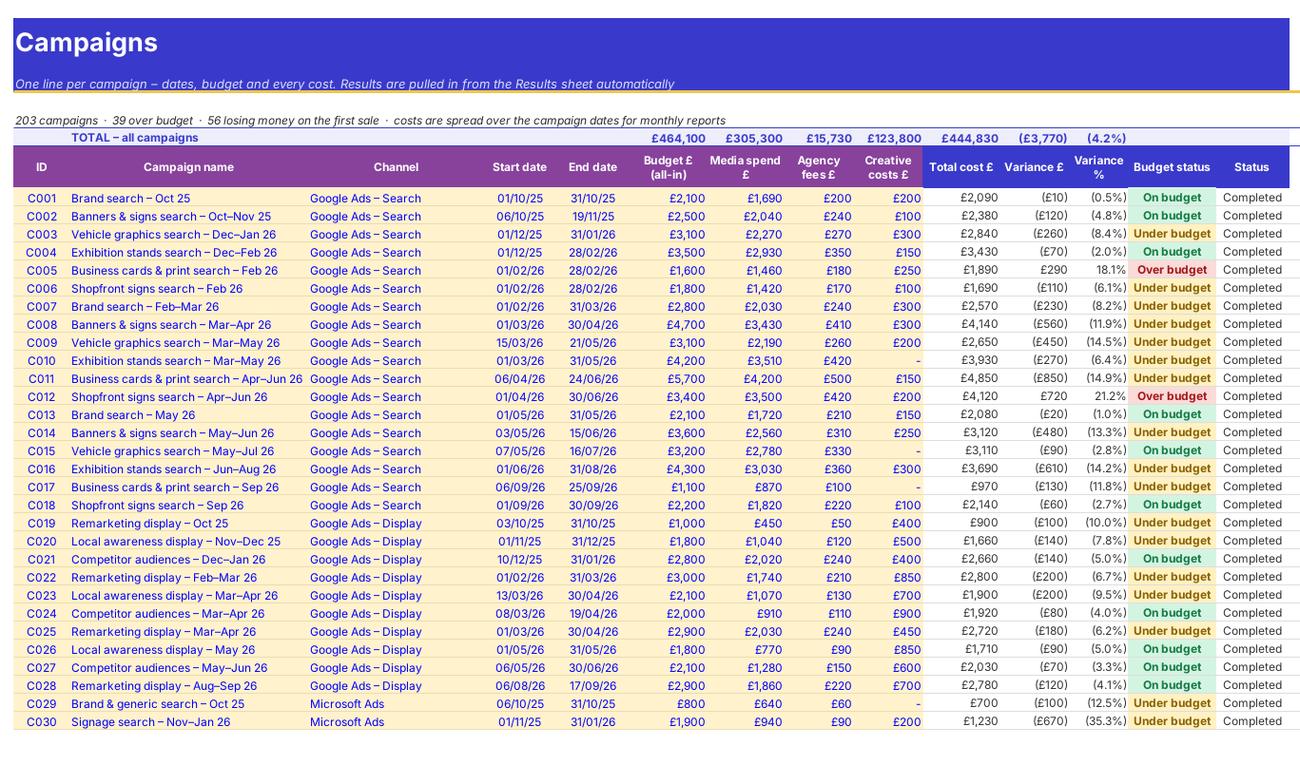
Campaigns

Every campaign with dates, budget and costs, plus its results and rating pulled in from the Results sheet. What you do: enter the yellow columns (B to J).
Campaigns
Results

Step 2

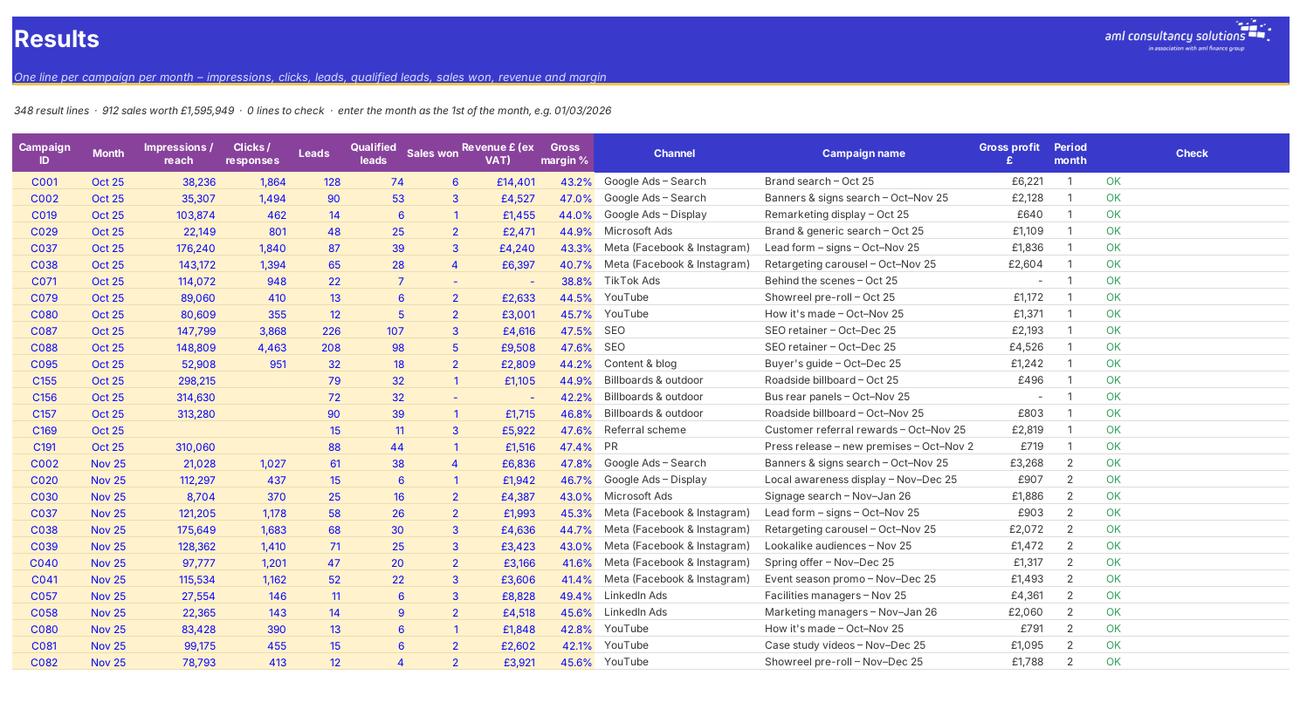
Results

Monthly results per campaign – the funnel, sales, revenue and margin. What you do: add a line per campaign per month (B to J).

Step 3

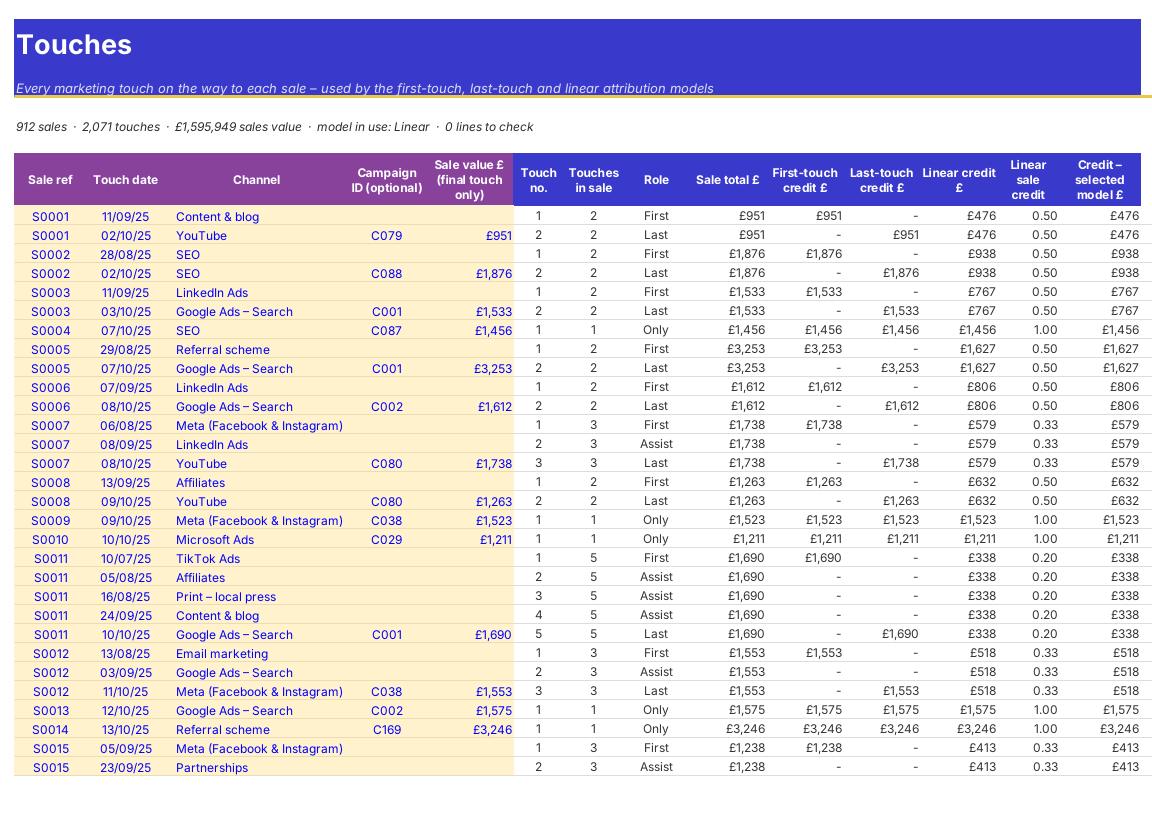
Touches

The marketing touches before each sale, for attribution. What you do: add a line per touch (B to F).
Touches
Channels

Step 4

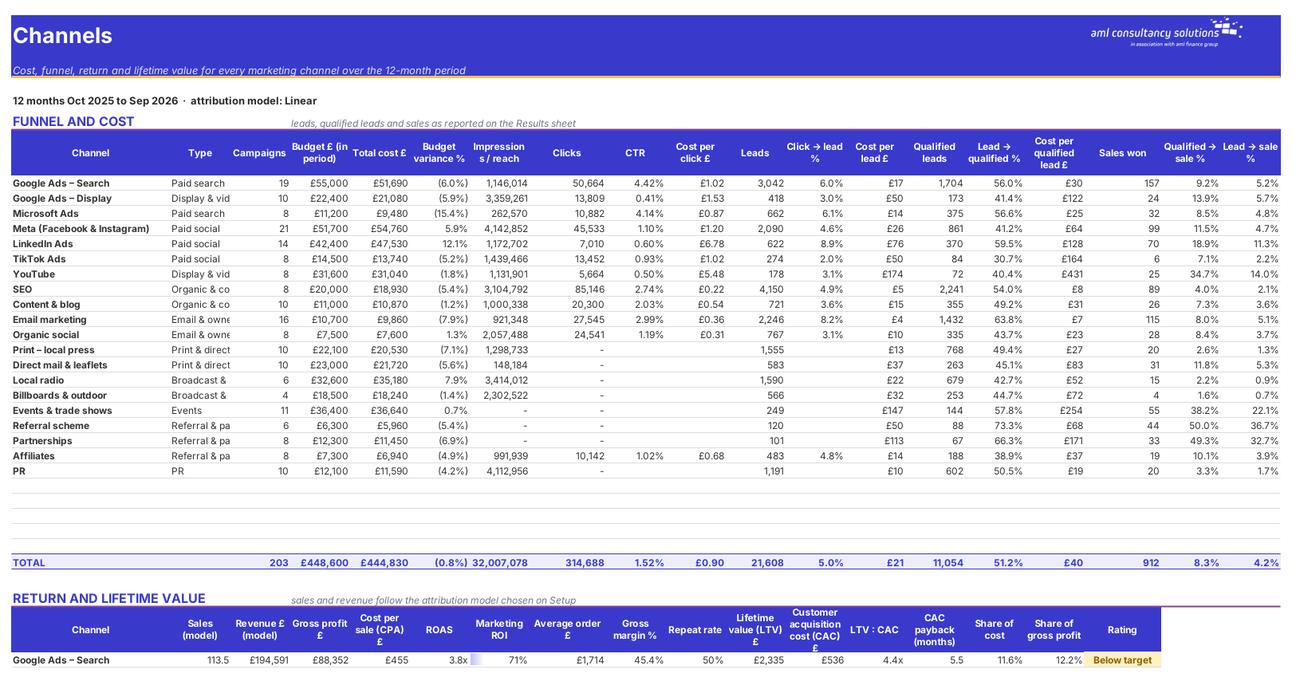
Channels

Funnel and cost, return and lifetime value, and a ranking by ROI for every channel. What you do: nothing – read and filter.

Who it is for

Made for people like you

  • Example – text
  • Small and medium businesses – A single view of every channel – online, offline and word of mouth – and what each returns.
  • Marketing managers – Campaign-level tracking, budget vs actual and a defensible case for next year's budget.
  • Owners and directors – A plain-English dashboard: what marketing costs, what it earns and what to change.
  • Agencies and freelancers – A consistent way to report results to clients across every channel.

Quick start

Up and running in minutes

  1. Example – text
  1. Setup – period and model – Enter your business name and the first month of the 12 months you want to report on. Choose an attribution model (start with Linear) and set your default gross margin.
  2. Setup – lifetime value and targets – Enter how often a typical customer orders each year and how many carry on buying. Set your targets for ROAS, ROI and LTV:CAC and your budget tolerance.
  3. Setup – channels – Check the channel list. Rename, add or remove channels to match how you market – these names drive every drop-down.
  4. Campaigns – Add one line per campaign: an ID, a name, the channel, start and end dates, the budget and the actual media spend, agency fees and creative costs.
  5. Results – Each month, add one line per live campaign with its impressions, clicks, leads, qualified leads, sales won, revenue and gross margin.
  6. Touches (optional but recommended) – For each sale, list the marketing touches the customer had before buying. This powers the first-touch, last-touch and linear models.
  7. Read the results – Start with the Dashboard, then Channels for the detail, Attribution to see how the credit moves, Budget vs Actual and finally Reallocation.

Key features

  • Up to 25 channels, 300 campaigns, 1,500 monthly result lines and 3,000 attribution touches – with dates, budgets, media, agency and creative costs.
  • Full funnel by channel and campaign: CTR, cost per click, cost per lead, qualified lead and sale conversion rates, cost per acquisition.
  • ROAS, marketing ROI on gross profit, customer lifetime value, LTV:CAC and CAC payback months – under as-reported, first-touch, last-touch or linear attribution.
  • Budget vs actual by channel and month, a recommended budget reallocation within your caps, monthly trends and a one-page dashboard.

What’s included

  • Dashboard – Marketing return at a glance
  • Setup – Period, model, LTV, targets, rules, channels
  • Campaigns – Every campaign, its costs and results
  • Results – Monthly results per campaign
  • Touches – Touches log for attribution
  • Channels – Funnel, ROI and LTV:CAC by channel
  • Attribution – Compare the attribution models
  • Budget vs Actual – Spend against budget
  • Reallocation – Where to move budget
  • Monthly Trend – Month-by-month performance
  • Guide – How to use this workbook

How buying works

Your file is only released once payment has cleared.

1

Click Buy now

You are taken to our secure checkout.

2

Pay securely

Checkout takes a minute and you get a receipt by email.

3

Download your file

Your download link arrives as soon as payment clears.

Explore the range

Need it tailored to your business?

We can adapt any prebuilt solution or build something bespoke, with a lifetime bug-free guarantee.

Part of AML Finance Group

Need an accountant too?

Our sister firm, AML Accountancy Solutions, is an award-winning accountancy practice helping businesses and individuals across the UK with their accounts, tax, bookkeeping and payroll.

Visit AML Accountancy Solutions

