← All prebuilt solutions
Tax & Company

P11D & Benefits Tracker

Track every benefit in kind, file P11Ds and the P11D(b), and get ready for payrolling in 2027

£20

Secure checkout. Your download link is sent as soon as payment clears.

P11D & Benefits Tracker

Overview

If your business gives staff anything other than pay – a company car, private medical insurance, a cheap loan, a gift card, a staff party – HMRC may treat it as a 'benefit in kind'. Each year you must report taxable benefits on a P11D for each employee, file a P11D(b) and pay Class 1A National Insurance by July. Some items are exempt and don't need reporting at all, and some can be taxed through payroll instead. This workbook keeps a running record of every benefit through the year, works out the taxable value of each one using HMRC's rules, and produces the P11D figures, the Class 1A bill, a PAYE Settlement Agreement (PSA) calculation and a checklist for mandatory payrolling.

Price
£20
Who it’s for
Tax & Company
Works with
Microsoft Excel for Windows and Mac
Buy now

See how it works

A walk through the main sheets

The sheets you will use most, in the order you will use them – shown with the sample data every workbook comes with.

Step 1

Employees

One row per employee or director, with their taxable benefits, Class 1A and whether a P11D is needed. What you do: enter the yellow columns.
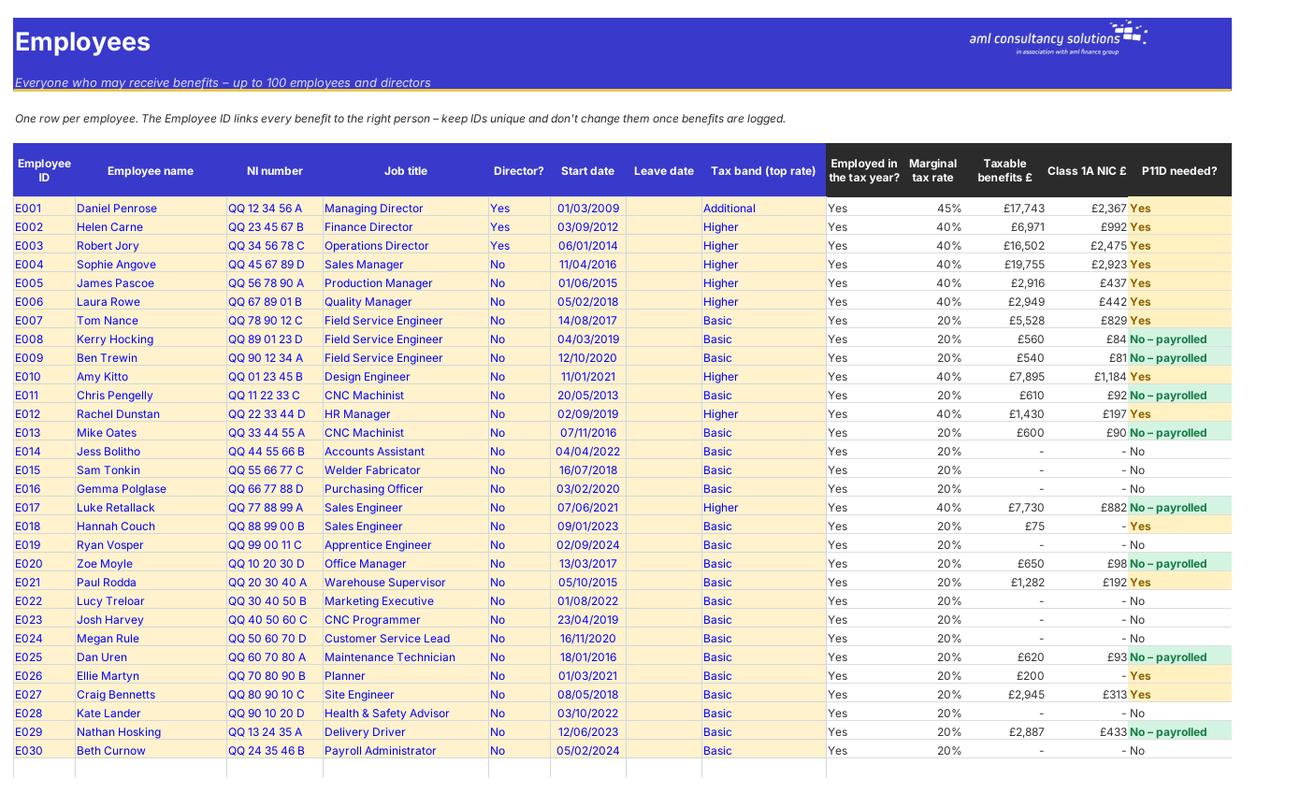
Employees
Benefits Log

Step 2

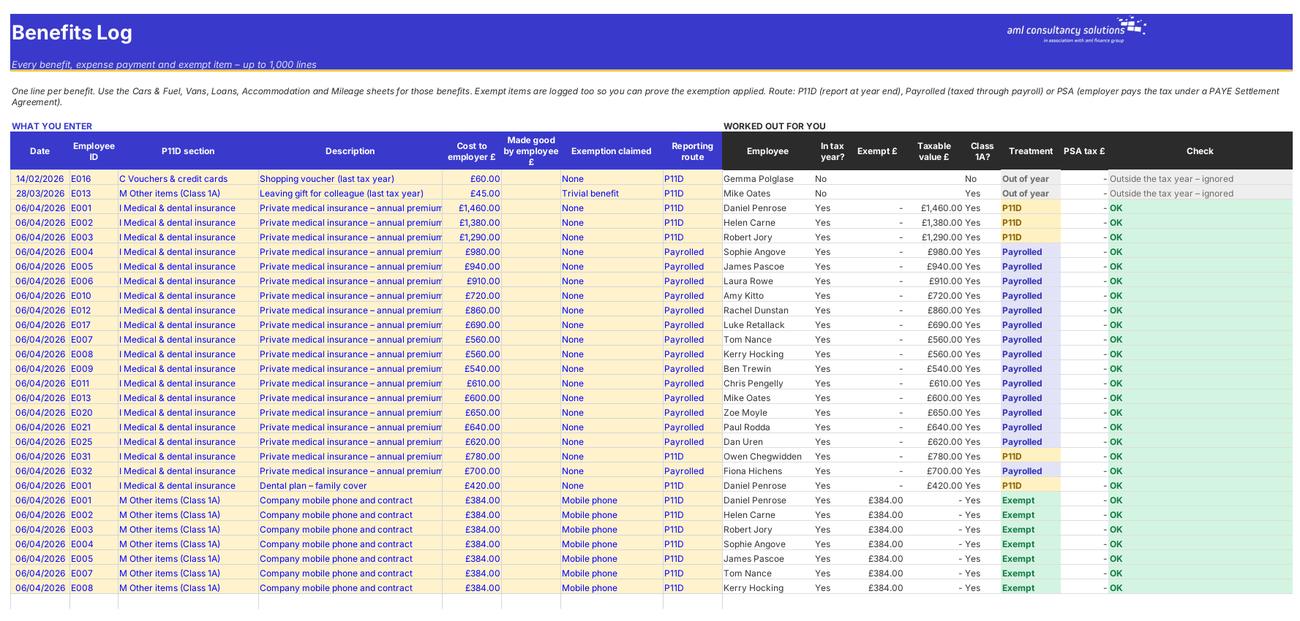
Benefits Log

Every benefit, expense payment and exempt item not covered by the dedicated sheets – up to 1,000 lines. What you do: add a line for each item.

Step 3

Cars & Fuel

Company car benefit and car fuel benefit (P11D section F). What you do: one row per car per employee.
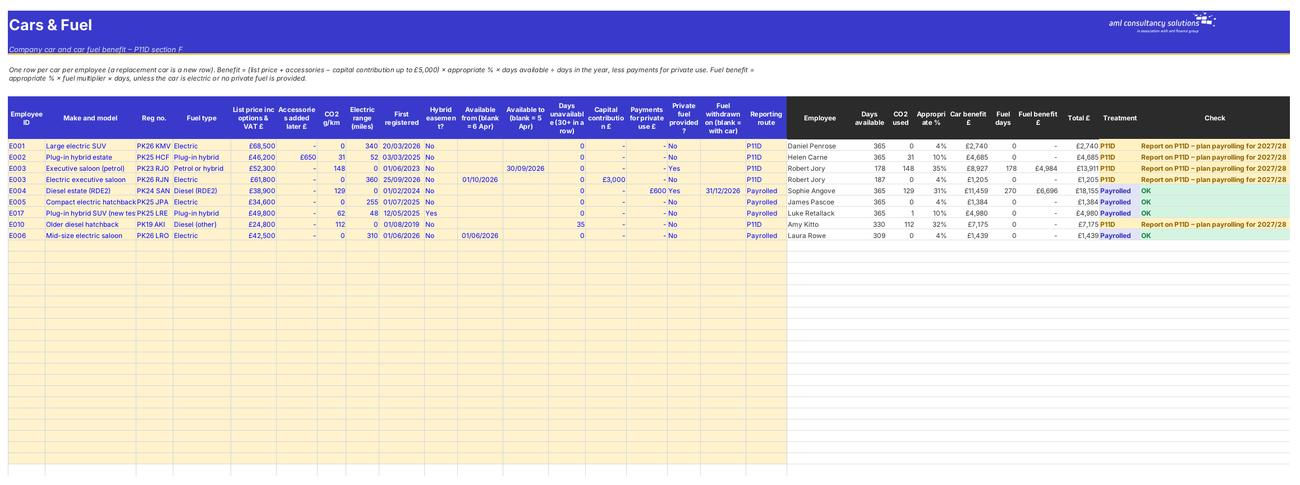
Cars & Fuel
Vans

Step 4

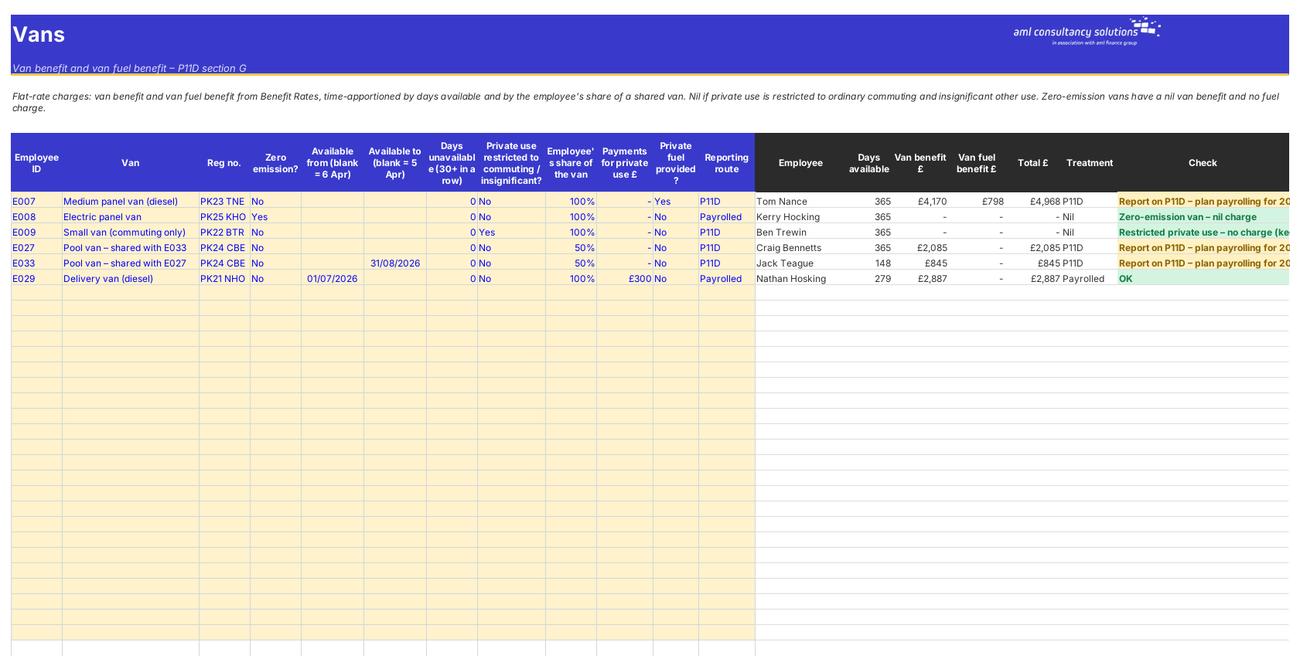
Vans

Van benefit and van fuel benefit (section G). What you do: one row per van per employee.

Who it is for

Made for people like you

  • Example – text
  • Owner-managed companies – Directors' cars, loans, flats and trivial benefits worked out correctly, including the £300 director cap on trivial benefits.
  • Employers with a benefits package – Medical insurance, cars, vans and mileage for up to 100 employees, with payrolled and P11D items kept apart.
  • Payroll and finance teams – A year-round log, automatic exemption checks, P11D working copies and the P11D(b) Class 1A figure ready to file.
  • Accountants and bookkeepers – A consistent P11D working file for each client, with every figure traceable back to the input line.

Quick start

Up and running in minutes

  1. Example – text
  1. Settings – Enter the employer name and PAYE reference, pick the tax year you are reporting, and say whether the company is a close company, whether you are registered to payroll benefits and whether you have a PSA.
  2. Employees – List everyone who receives benefits – ID, name, NI number, director yes/no, start and leave dates and their top rate of tax.
  3. Cars, vans, loans, accommodation, mileage – Fill in the dedicated sheet for each of these benefits. They need their own details (CO2, dates, balances) so they have their own calculators.
  4. Benefits Log – Log everything else as it happens – medical insurance, gifts, parties, phones, assets, relocation, expenses – including exempt items, so you can prove the exemption applied.
  5. Check the warnings – Read the Check column on each sheet. Anything that isn't 'OK' – a trivial benefit over £50, a party over £150, a second phone, an item outside the tax year – needs a look.
  6. Year end – Use the P11D Summary and P11D Form for each employee's figures, the P11D(b) & Class 1A sheet for the return and payment, and the PSA sheet for any settlement items.
  7. Plan payrolling – Use the Payrolling 2027 sheet to see which benefits must move into payroll from 6 April 2027 and track the tasks to get there.

Key features

  • Log up to 1,000 benefits for 100 employees by P11D section, with automatic checks on trivial benefits, the £150 party limit, phones, homeworking and relocation.
  • Dedicated calculators for company cars and fuel, vans, beneficial loans, living accommodation and mileage allowance payments.
  • Per-employee P11D values, a printable P11D working copy, the P11D(b) Class 1A calculation and every deadline with a countdown.
  • PSA grossed-up tax and Class 1B, payrolled benefits, and a readiness tracker for mandatory payrolling from 6 April 2027.

What’s included

  • Dashboard – Benefits, Class 1A and deadlines at a glance
  • Settings – Employer, tax year and reporting choices
  • Employees – Up to 100 employees and directors
  • Benefits Log – Every benefit and exempt item – 1,000 lines
  • Cars & Fuel – Car and car fuel benefit (section F)
  • Vans – Van and van fuel benefit (section G)
  • Loans – Beneficial loans (section H)
  • Accommodation – Living accommodation (section D)
  • Mileage – Mileage allowance excess (section E)
  • P11D Summary – Every employee's P11D by section
  • P11D Form – One employee's P11D working copy
  • P11D(b) & Class 1A – Class 1A NIC, P11D(b) and deadlines
  • PSA – PAYE Settlement Agreement calculation
  • Payrolling 2027 – Mandatory payrolling readiness
  • Benefit Rates – Benefit rates and limits by year
  • Tax Rates – Income tax and NI rates
  • Guide – How to use this workbook

How buying works

Your file is only released once payment has cleared.

1

Click Buy now

You are taken to our secure checkout.

2

Pay securely

Checkout takes a minute and you get a receipt by email.

3

Download your file

Your download link arrives as soon as payment clears.

Explore the range

Need it tailored to your business?

We can adapt any prebuilt solution or build something bespoke, with a lifetime bug-free guarantee.

Part of AML Finance Group

Need an accountant too?

Our sister firm, AML Accountancy Solutions, is an award-winning accountancy practice helping businesses and individuals across the UK with their accounts, tax, bookkeeping and payroll.

Visit AML Accountancy Solutions

