← All prebuilt solutions
Lite & Free

Payroll Calculator & Payslips – Lite

Monthly payroll for up to 5 people – PAYE, NI, student loans, pension, payslips and P32

£5

Secure checkout. Your download link is sent as soon as payment clears.
Payroll Calculator & Payslips – Lite

Overview

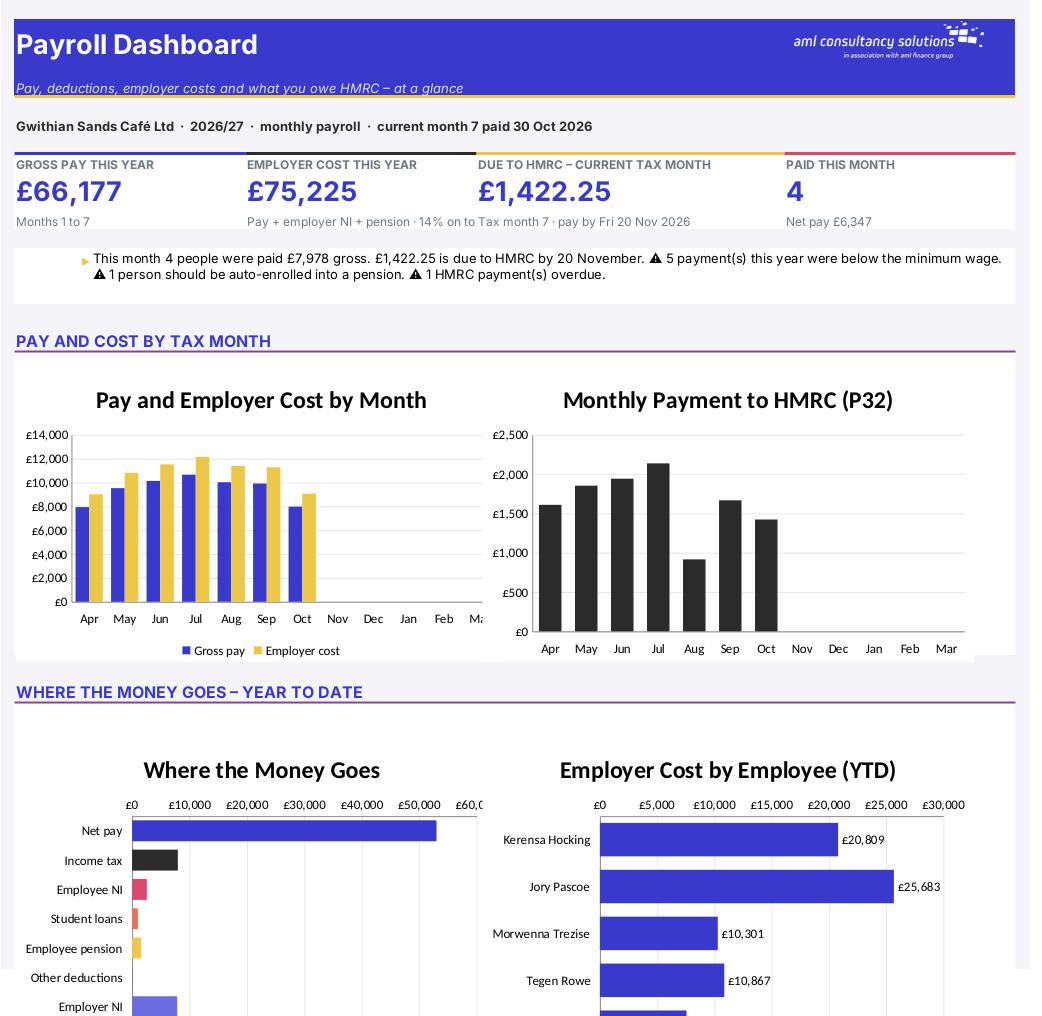
This workbook works out a monthly UK payroll for a small employer with up to five people. You enter each employee once, then each month you enter only what changes – hours for hourly-paid staff, overtime, a bonus, holiday pay or a deduction. The workbook calculates PAYE income tax using HMRC's cumulative tax table method, employee and employer National Insurance, student and postgraduate loan deductions, a workplace pension, net pay and the total cost to you. It then produces a printable payslip for anyone in any month, year-to-date totals and the P32 record of what you owe HMRC each month and when it must be paid.

Price
£5
Who it’s for
Lite & Free
Works with
Microsoft Excel for Windows and Mac
Buy now

See how it works

A walk through the main sheets

The sheets you will use most, in the order you will use them – shown with the sample data every workbook comes with.

Step 1

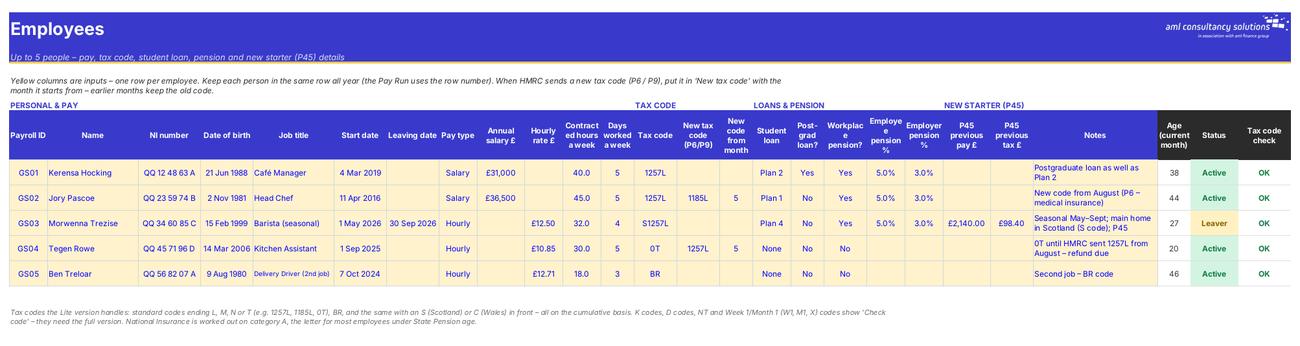
Employees

Everyone on the payroll and the details that drive their tax, NI, loans and pension. What you do: add starters, record leavers and new tax codes.
Employees
Pay Run

Step 2

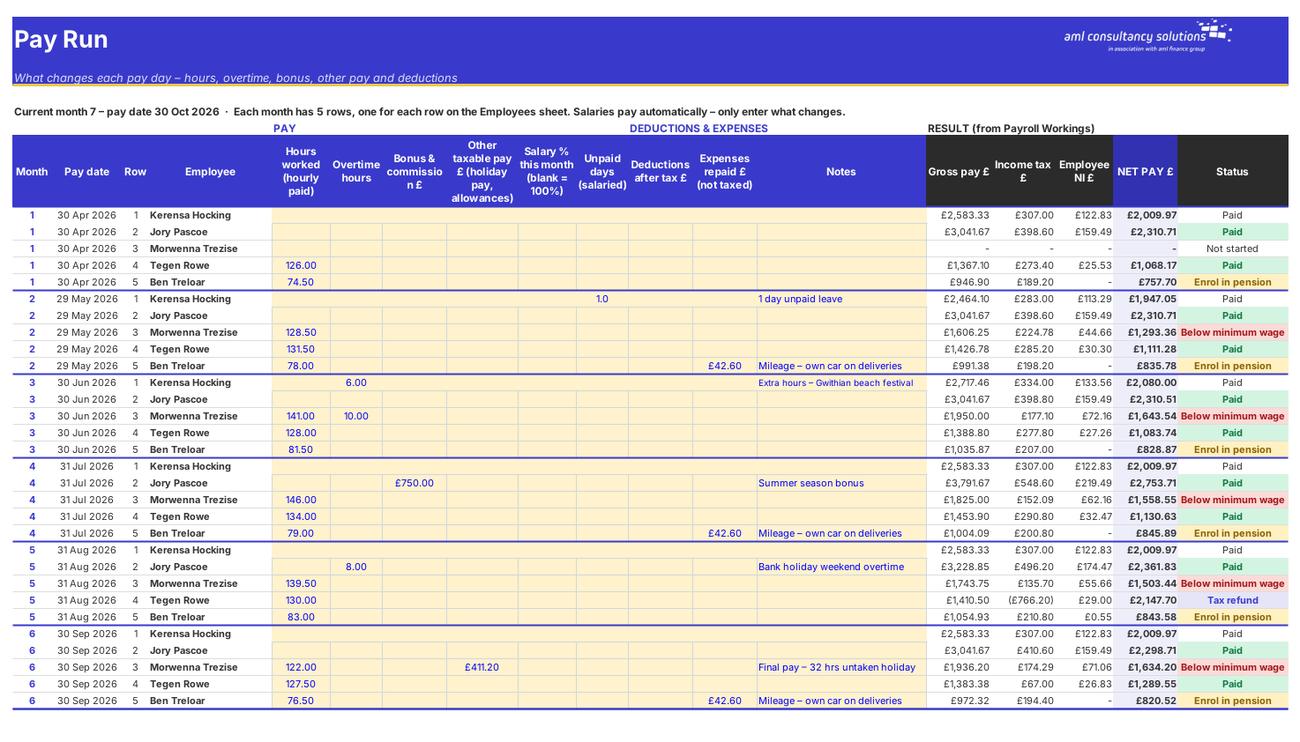
Pay Run

What changes for each person each month, with gross pay, tax, NI and net pay shown alongside. What you do: enter hours and changes for the month you're paying.

Step 3

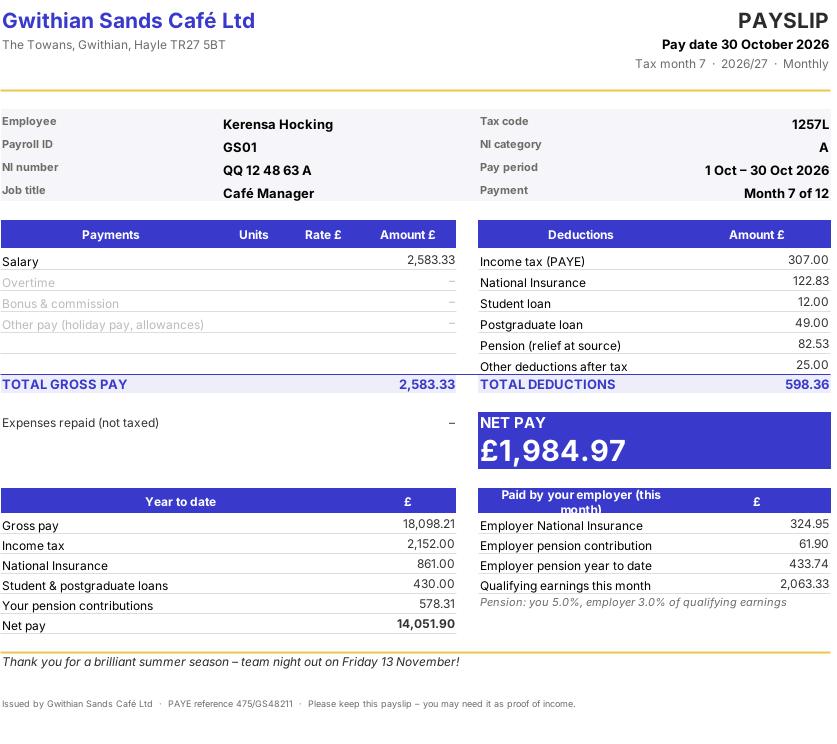
Payslip

A one-page A4 payslip for any employee and month. What you do: pick the employee and month, then print or save as PDF.
Payslip
YTD & P32

Step 4

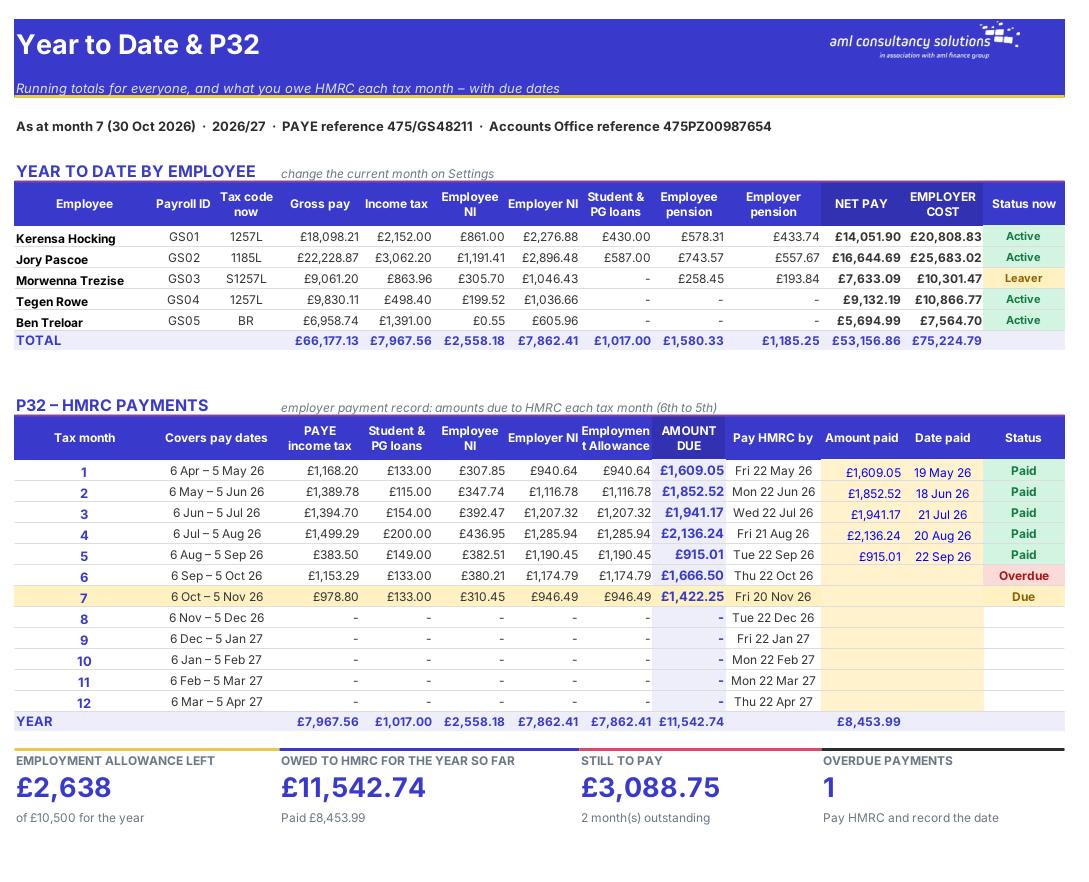
YTD & P32

Year-to-date totals for every employee, and the P32: what you owe HMRC each tax month, the due date and whether it's paid. What you do: record the amount and date of each HMRC payment.

Who it is for

Made for people like you

  • Example – text
  • WATCH OUT – This workbook is NOT RTI payroll software. HMRC requires every employer to report each payment on or before pay day using a Full Payment Submission (FPS), and to claim Employment Allowance on an Employer Payment Summary (EPS). You must do that with HMRC-recognised software – HMRC's free Basic PAYE Tools works for up to 9 employees. Use this workbook to calculate, check, budget and produce payslips, and copy the figures into your RTI submission.
  • What the Lite version covers – Details
  • People and pay – Up to 5 employees, paid monthly. Salaried or hourly, with overtime, bonus and commission, holiday pay and other taxable pay, part-month salaries and unpaid days.
  • Tax codes – Standard codes ending L, M, N or T (such as 1257L, 1185L and 0T), BR, and the same codes with an S (Scotland) or C (Wales) in front – all on the cumulative basis, with mid-year code changes and P45 figures for new starters.
  • National Insurance – Category A – the letter for most employees aged 21 or over and under State Pension age.
  • Loans and pension – Student loan Plans 1, 2, 4 and 5, postgraduate loans, and a relief at source workplace pension worked out on qualifying earnings.

Quick start

Up and running in minutes

  1. Example – text
  1. Settings – Enter your business name, address and PAYE references, choose the tax year and type your first pay date. Check the pay calendar on the right – it lists all 12 pay dates and the tax month each one falls in.
  2. Employees – Click 'Clear sample data', then add one row per employee: personal details, salary or hourly rate, tax code, student loan, pension and – for new starters – the P45 figures. Keep each person on the same row all year.
  3. Pay Run – Find the five rows for the month you're paying (the month number is in column B). Salaried staff are paid automatically; enter hours for hourly staff and anything else that changes.
  4. Move the current month on – On Settings, set 'Current pay period' to the month you've just entered. Later months are not calculated until you do this, so the HMRC figures and year-to-date totals stay right.
  5. Check and print – Look at the results on the Pay Run and the Dashboard checks, then print or save a payslip for each person from the Payslip sheet.
  6. Report and pay HMRC – Copy the figures into your RTI software (FPS on or before pay day). Each month, pay HMRC the amount on the YTD & P32 sheet by the due date and record the payment.

Key features

  • Monthly payroll for up to 5 employees for 2025/26, 2026/27 or 2027/28 – salaried or hourly, with overtime, bonus and other pay.
  • Cumulative PAYE using HMRC's tax table method for standard codes (e.g. 1257L, 0T), BR, and Scottish (S) and Welsh (C) codes, including mid-year code changes and P45 figures.
  • Category A National Insurance, student loans (Plans 1, 2, 4 and 5) and postgraduate loans, and a relief at source workplace pension on qualifying earnings.
  • Printable A4 payslips, year-to-date totals, a P32 employer payment record with due dates, minimum wage and auto-enrolment checks.
  • Not RTI software: report each payment to HMRC on an FPS using HMRC-recognised payroll software.

What’s included

  • Dashboard – Pay, costs and HMRC payments at a glance
  • Settings – Employer, tax year, pay calendar
  • Employees – Tax codes, loans, pension
  • Pay Run – What changes each pay day
  • Payslip – One A4 payslip per person per month
  • YTD & P32 – Year to date and what you owe HMRC
  • Payroll Workings – Every calculation, line by line
  • Tax Rates – Rates, thresholds and tax tables
  • Guide – How to use this workbook

How buying works

Your file is only released once payment has cleared.

1

Click Buy now

You are taken to our secure checkout.

2

Pay securely

Checkout takes a minute and you get a receipt by email.

3

Download your file

Your download link arrives as soon as payment clears.

Explore the range

Need it tailored to your business?

We can adapt any prebuilt solution or build something bespoke, with a lifetime bug-free guarantee.

Part of AML Finance Group

Need an accountant too?

Our sister firm, AML Accountancy Solutions, is an award-winning accountancy practice helping businesses and individuals across the UK with their accounts, tax, bookkeeping and payroll.

Visit AML Accountancy Solutions

