← All prebuilt solutions
Payroll & HR

Staff Cost Calculator

The true cost of employing people – before you hire, and across your whole team

£20

Secure checkout. Your download link is sent as soon as payment clears.
Staff Cost Calculator

Overview

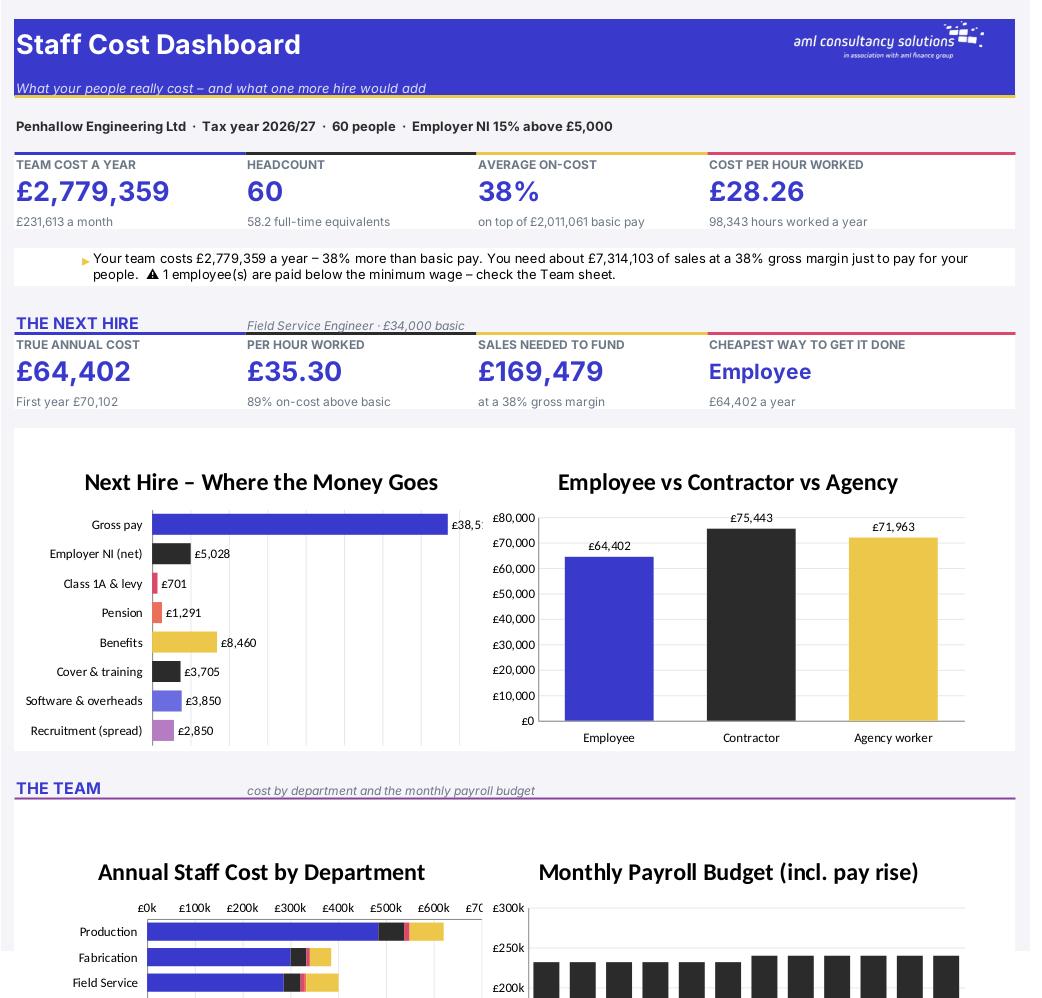
A salary is only the start of what an employee costs. On top of basic pay come overtime and bonuses, employer National Insurance, pension contributions, benefits, holiday and sickness cover, training, software, desk space, recruitment fees and equipment. And because people take holidays, bank holidays, sick days and training days, the hours they actually work are far fewer than the hours you pay for. This workbook adds all of that up so you can see the true annual cost of a new hire, what each hour of their work really costs, how much extra you need to sell to pay for them, and what your whole team costs by department and by month.

Price
£20
Who it’s for
Payroll & HR
Works with
Microsoft Excel for Windows and Mac
Buy now

See how it works

A walk through the main sheets

The sheets you will use most, in the order you will use them – shown with the sample data every workbook comes with.

Step 1

Single Hire

The true cost of one employee, with a full cost build-up, hours worked, minimum wage check, chart and workings. What you do: enter the yellow cells for the role.

Single Hire
Team

Step 2

Team

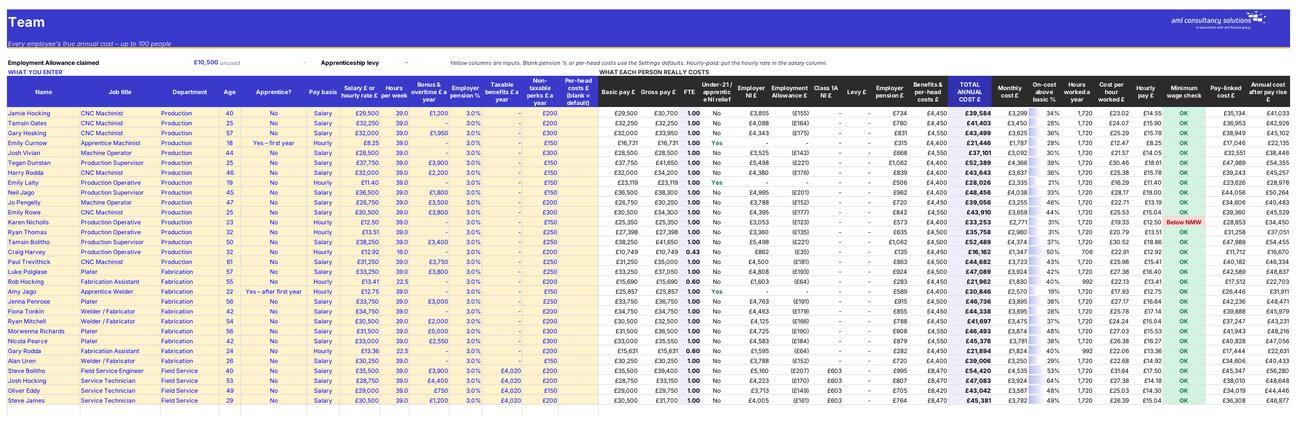
Every employee's cost: NI, Employment Allowance share, Class 1A, levy, pension, benefits, per-head costs, cost per hour. What you do: one row per person.

Step 3

Payroll Budget

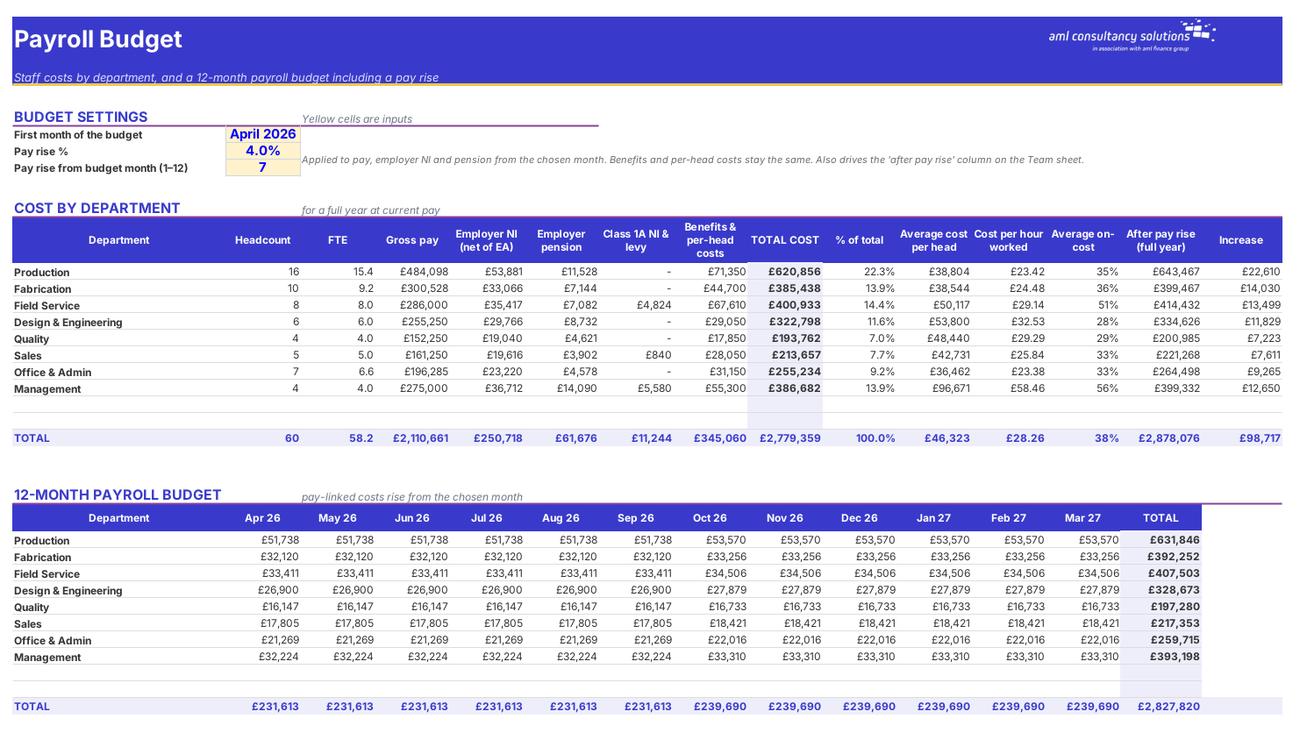
Cost by department and a month-by-month payroll budget with a pay rise. What you do: set the budget start, pay rise % and month.
Payroll Budget
Comparisons

Step 4

Comparisons

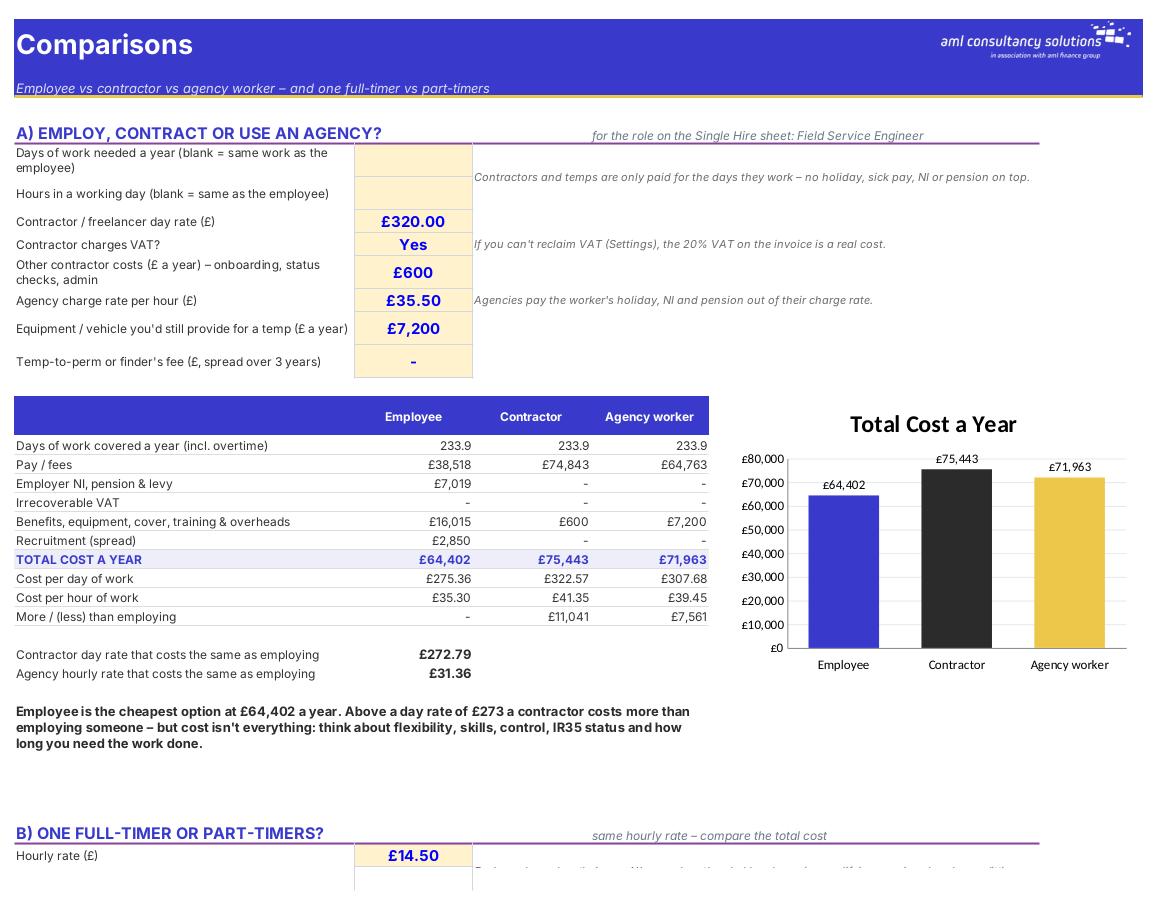
A) employee vs contractor vs agency; B) one full-timer vs part-timers. What you do: enter rates and hours.

Who it is for

Made for people like you

  • Example – text
  • Owners thinking about a new hire – The true annual and first-year cost of the role, cost per hour actually worked and the sales needed to fund it.
  • Businesses with a team – Every employee's full cost on one sheet, a payroll budget by department and a 12-month budget including a pay rise.
  • Anyone deciding how to resource work – Employee vs contractor vs agency worker, and one full-timer vs part-timers, side by side.
  • Anyone planning pay reviews – What a pay rise really costs you – and how much of it the employee actually takes home.

Quick start

Up and running in minutes

  1. Example – text
  1. Settings – Pick the tax year, say whether you claim the Employment Allowance, and check the standard working pattern, holiday, sickness and per-head costs. Rename the departments to match your business.
  2. Single Hire – Describe the role you're thinking of filling – pay, hours, pension, benefits, recruitment costs and time off. The tiles at the top show the true cost straight away. The Clear sample data button keeps this example (and the Comparisons and Pay Rise examples) – just type over it.
  3. Team – Click 'Clear sample data', then add one row per employee: name, job title, department, age, pay and hours. Everything else calculates.
  4. Payroll Budget – Set the first month of your budget, the pay rise % and the month it starts. You get a cost-by-department table and a 12-month budget.
  5. Comparisons – Enter a contractor day rate and an agency charge rate to see whether employing, contracting or using an agency is cheapest for the role on Single Hire.
  6. Pay Rise – Enter an employee's pay and a proposed rise to see the extra cost to you and the extra take-home pay for them.
  7. Dashboard – Read the headline figures, charts and watch list – including anyone paid below the minimum wage.

Key features

  • True annual cost of a new hire: pay, overtime, bonus, employer NI, Employment Allowance, pension, benefits, time off, cover, recruitment, equipment and overheads.
  • Cost per hour actually worked, on-cost above salary, minimum wage check and the extra sales needed to fund the hire.
  • Team sheet for up to 100 people with a payroll budget by department and a 12-month budget including a pay rise.
  • Employee vs contractor vs agency, one full-timer vs part-timers, and what a pay rise really costs you and puts in the employee's pocket.

What’s included

  • Dashboard – Your people costs at a glance
  • Settings – Tax year, defaults and departments
  • Single Hire – True cost of one employee
  • Team – Every employee's cost
  • Payroll Budget – By department and month
  • Comparisons – Employee vs contractor vs agency; full vs part-time
  • Pay Rise – What a pay rise costs and what they keep
  • Tax Rates – NI, pension, sick pay and minimum wage rates
  • Guide – How to use this workbook

How buying works

Your file is only released once payment has cleared.

1

Click Buy now

You are taken to our secure checkout.

2

Pay securely

Checkout takes a minute and you get a receipt by email.

3

Download your file

Your download link arrives as soon as payment clears.

Explore the range

Need it tailored to your business?

We can adapt any prebuilt solution or build something bespoke, with a lifetime bug-free guarantee.

Part of AML Finance Group

Need an accountant too?

Our sister firm, AML Accountancy Solutions, is an award-winning accountancy practice helping businesses and individuals across the UK with their accounts, tax, bookkeeping and payroll.

Visit AML Accountancy Solutions

