← All prebuilt solutions
Payroll & HR

Training Matrix & Expiry Tracker

Who needs which training, who has it, what is expiring – and what renewals will cost

£20

Secure checkout. Your file is ready in your client portal as soon as payment clears.
Training Matrix & Expiry Tracker

Overview

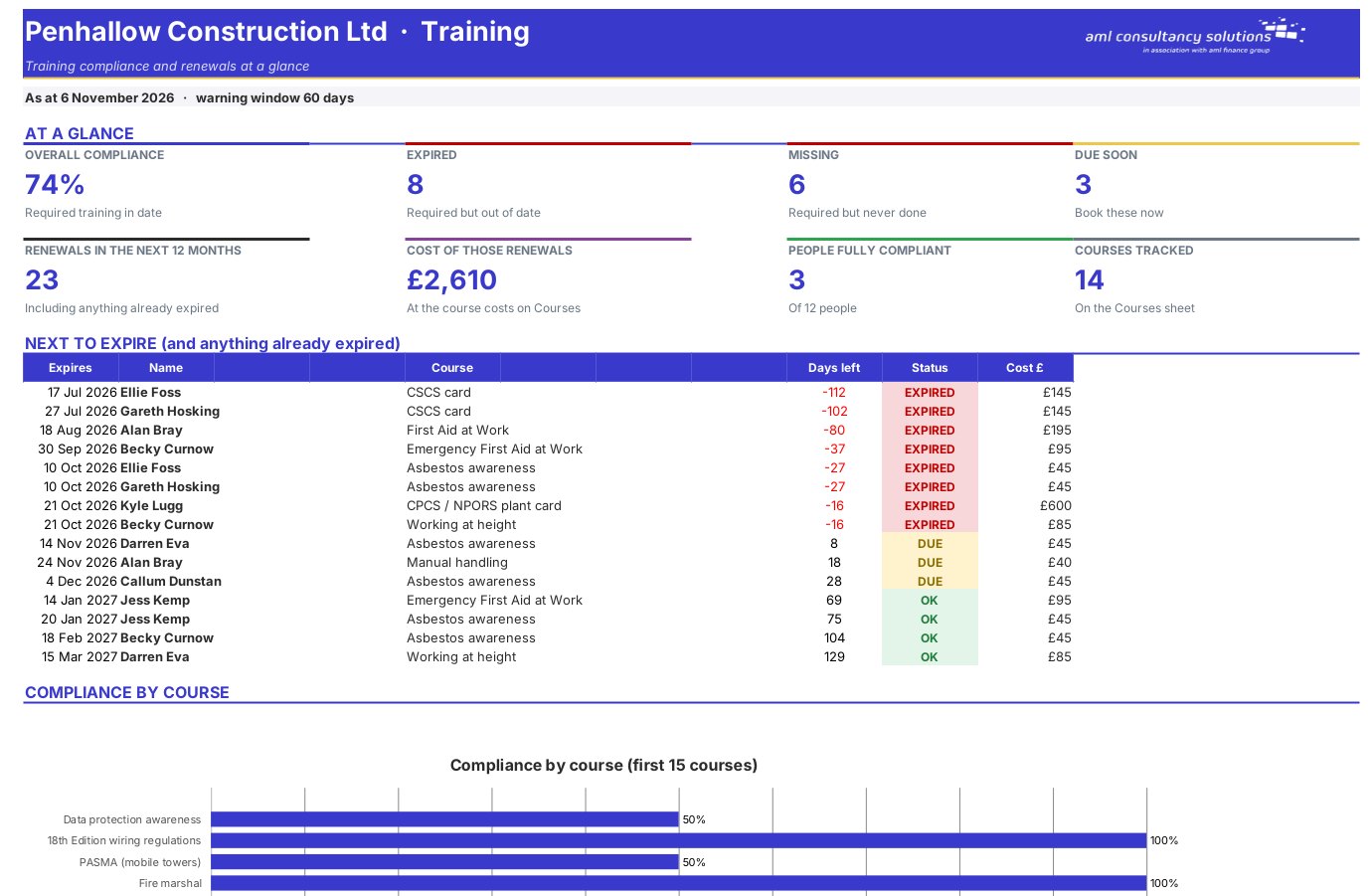
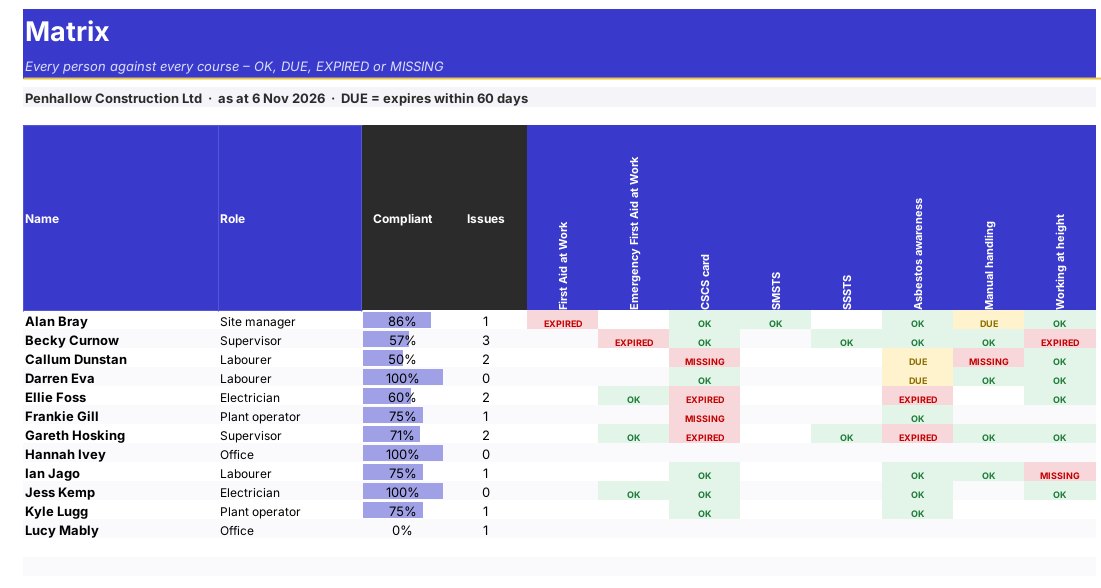
Inspectors, insurers and clients all expect you to show that staff have the training their job requires and that it is in date. This tracker sets out the courses each role needs, records every course completed, and builds a matrix of everyone against every course showing green for in date, amber for expiring soon and red for missing or expired. The dashboard lists the next certificates to expire so you can book refreshers in time.

Price
£20
Who it’s for
Payroll & HR
Works with
Microsoft Excel for Windows and Mac
Buy now

See how it works

A walk through the main sheets

The sheets you will use most, in the order you will use them – shown with the sample data every workbook comes with.

Step 1

Training Log

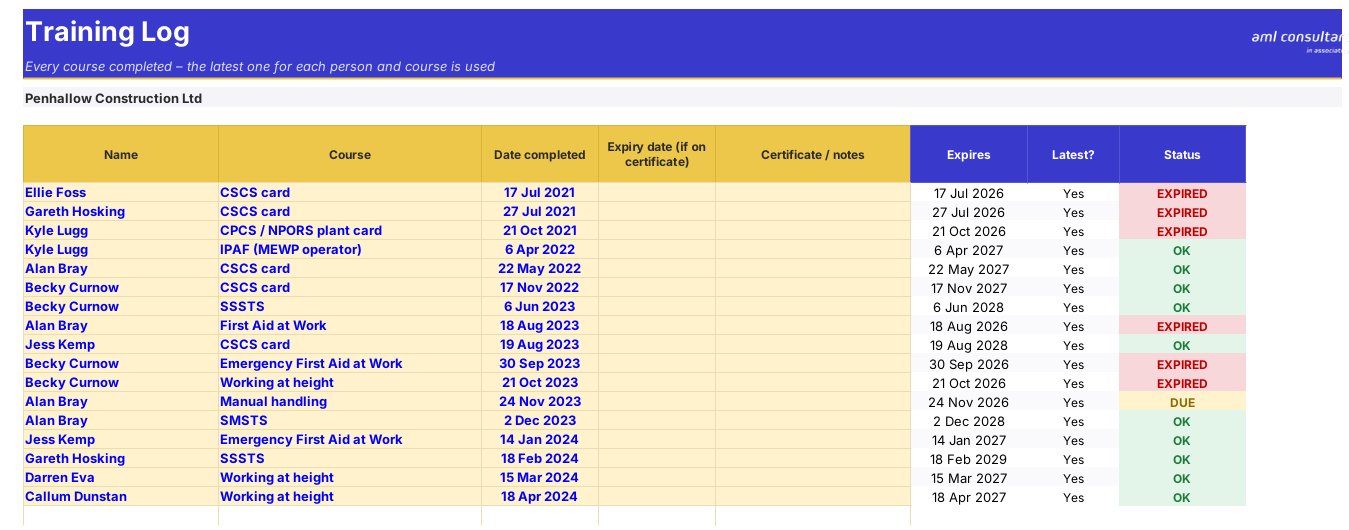
Every course completed, with the expiry date worked out. What you do: one row per course attended.
Training Log
Matrix

Step 2

Matrix

Everyone against every course – green, amber or red. What you do: nothing to enter.

Step 3

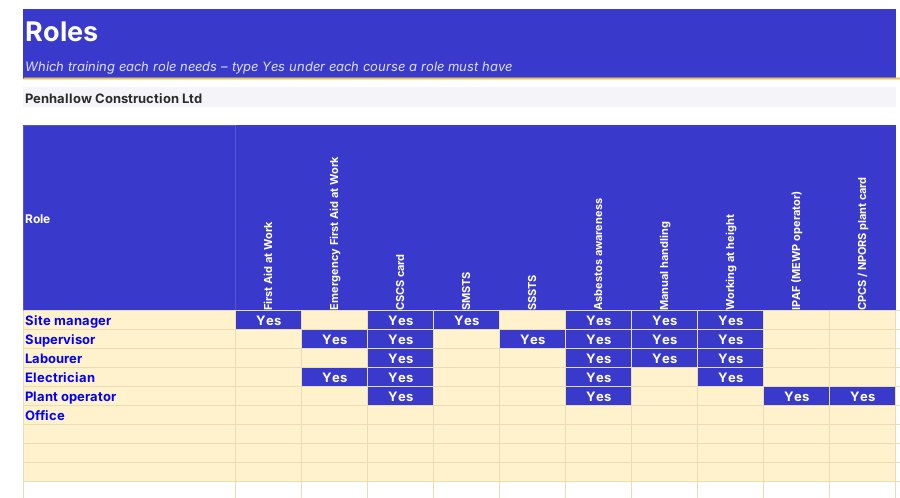
Roles

The courses each role needs. What you do: tick the courses for each role.
Roles

Step 4

Who it is for

Made for people like you

  • Example – text
  • Care homes and childcare settings – Show inspectors that every mandatory course is in date.
  • Construction, manufacturing and warehousing – Track tickets and certificates by role.
  • Hospitality and retail – Food hygiene, allergen and licensing training kept current.
  • HR and compliance managers – One matrix for the whole organisation.

Quick start

Up and running in minutes

  1. Example – text
  1. Settings – Enter your business name and how much warning you want before expiry.
  2. Courses – List each course and how often it must be renewed.
  3. Roles – Tick the courses each role needs.
  4. Staff – List your people and their role.
  5. Training Log – Record each course completed with its date.
  6. Matrix and Dashboard – See what is missing, expiring or out of date.

Key features

  • Up to 40 courses with renewal periods and 15 roles with the courses each needs.
  • Up to 80 staff and 1,500 training records.
  • Colour-coded matrix of every person against every course.
  • The next 15 expiries and compliance percentage by course.

What’s included

  • Dashboard – Compliance and renewals at a glance
  • Settings – Business and warning window
  • Courses – Courses, renewal periods and costs
  • Roles – Training each role needs
  • Staff – Everyone you track
  • Training Log – Every course completed
  • Matrix – The full training matrix
  • Guide – How to use this workbook

How buying works

Your file is only released to your client portal once payment has cleared.

1

Click Buy now

You are taken to our secure checkout.

2

Pay securely

Checkout takes a minute and you get a receipt by email.

3

Download your file

Your file is ready in your client portal as soon as payment clears, and we email you your invoice with a link to the portal.

Explore the range

Need it tailored to your business?

We can adapt any prebuilt solution or build something bespoke, with a lifetime bug-free guarantee.

Part of AML Finance Group

Need an accountant too?

Our sister firm, AML Accountancy Solutions, is an award-winning accountancy practice helping businesses and individuals across the UK with their accounts, tax, bookkeeping and payroll.

Visit AML Accountancy Solutions