← All prebuilt solutions
Management Accounts & Reporting

Xero Management Pack

Monthly management accounts built straight from your Xero data

£20

Secure checkout. Your download link is sent as soon as payment clears.
Xero Management Pack

Overview

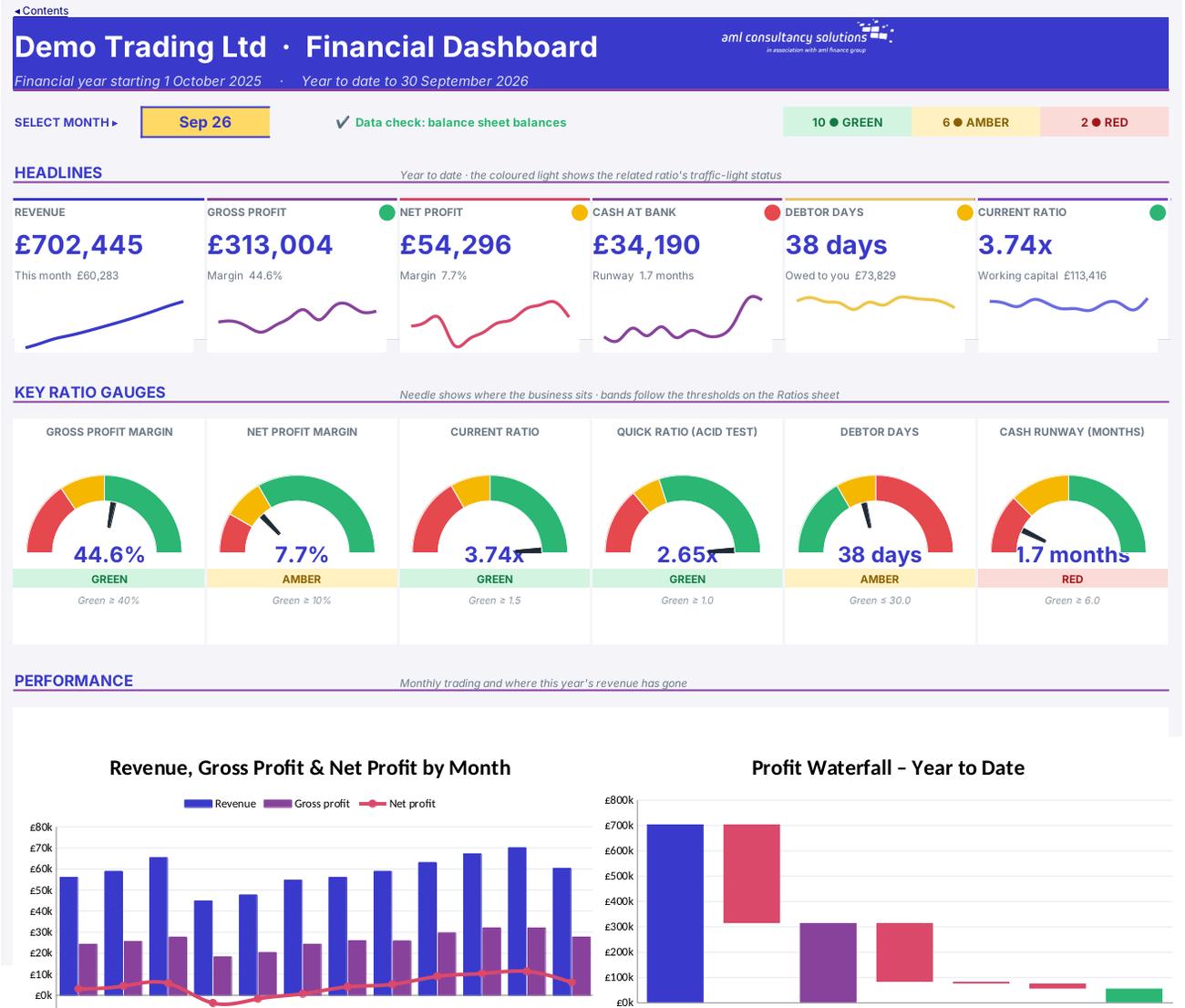
The Xero Management Pack turns a straight copy of your Xero chart of accounts and transactions into a complete set of monthly management accounts: a cover and contents page, an executive summary with automatically written key messages, a visual dashboard, a detailed profit and loss account against budget, a balance sheet, a cash flow statement, a 12-month trend and 18 financial ratios with traffic lights. Pick a month and the whole pack updates – ready to print or PDF for the directors, the bank or investors.

Price
£20
Who it’s for
Management Accounts & Reporting
Works with
Microsoft Excel for Windows and Mac
Buy now

See how it works

A walk through the main sheets

The sheets you will use most, in the order you will use them – shown with the sample data every workbook comes with.

Step 1

Executive Summary

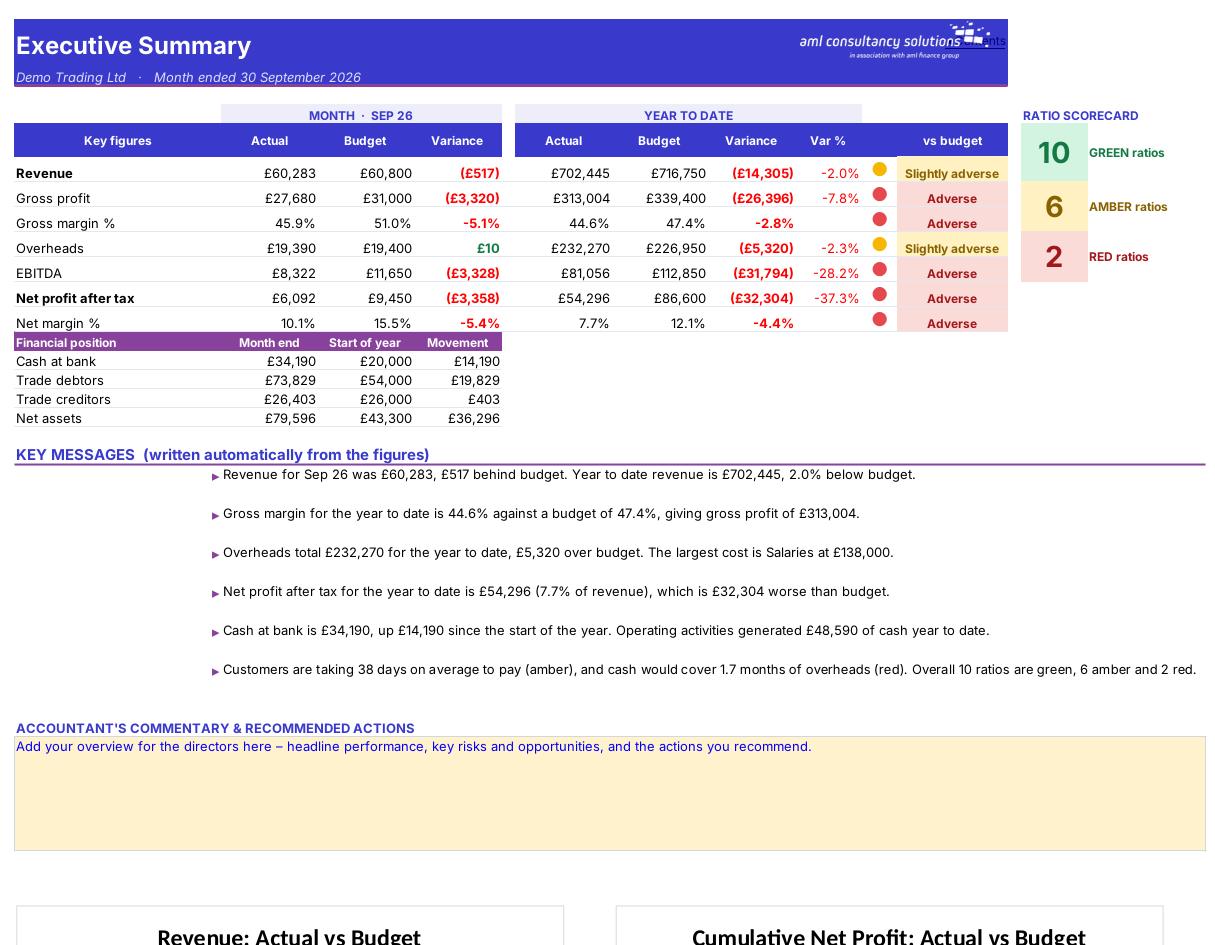
Key figures against budget, financial position, ratio scorecard, automatic key messages and two charts. What you do: write your overview in the yellow commentary box.
Executive Summary
Profit & Loss

Step 2

Profit & Loss

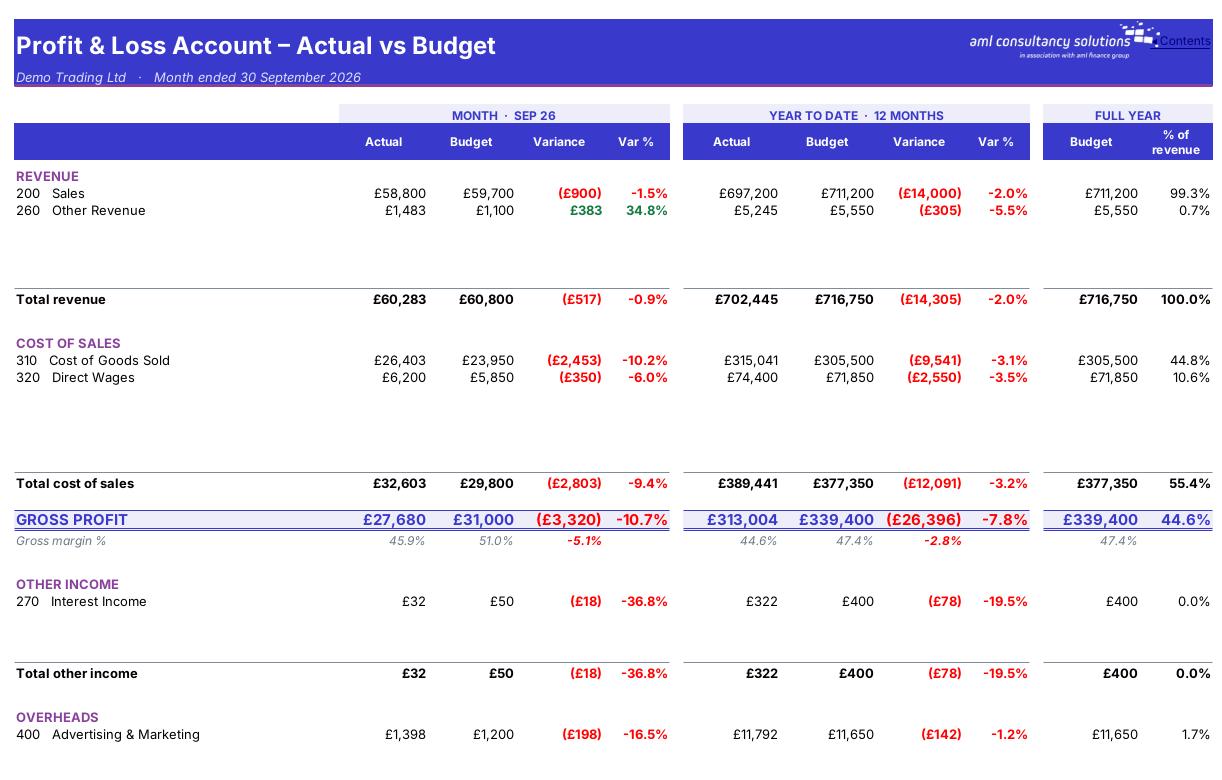
Every income and cost account – month, year to date and full-year budget, with variances. What you do: write commentary on results in the yellow box.

Step 3

Balance Sheet

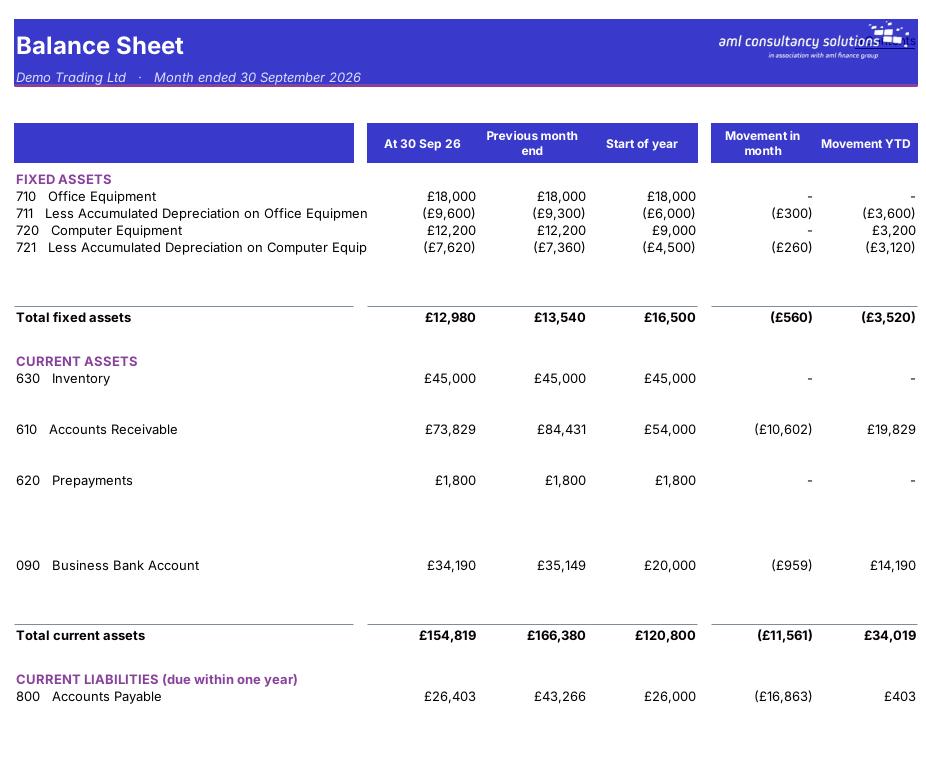
Assets, liabilities and equity at month end, last month end and start of year. What you do: write commentary on the financial position.
Balance Sheet
Cash Flow

Step 4

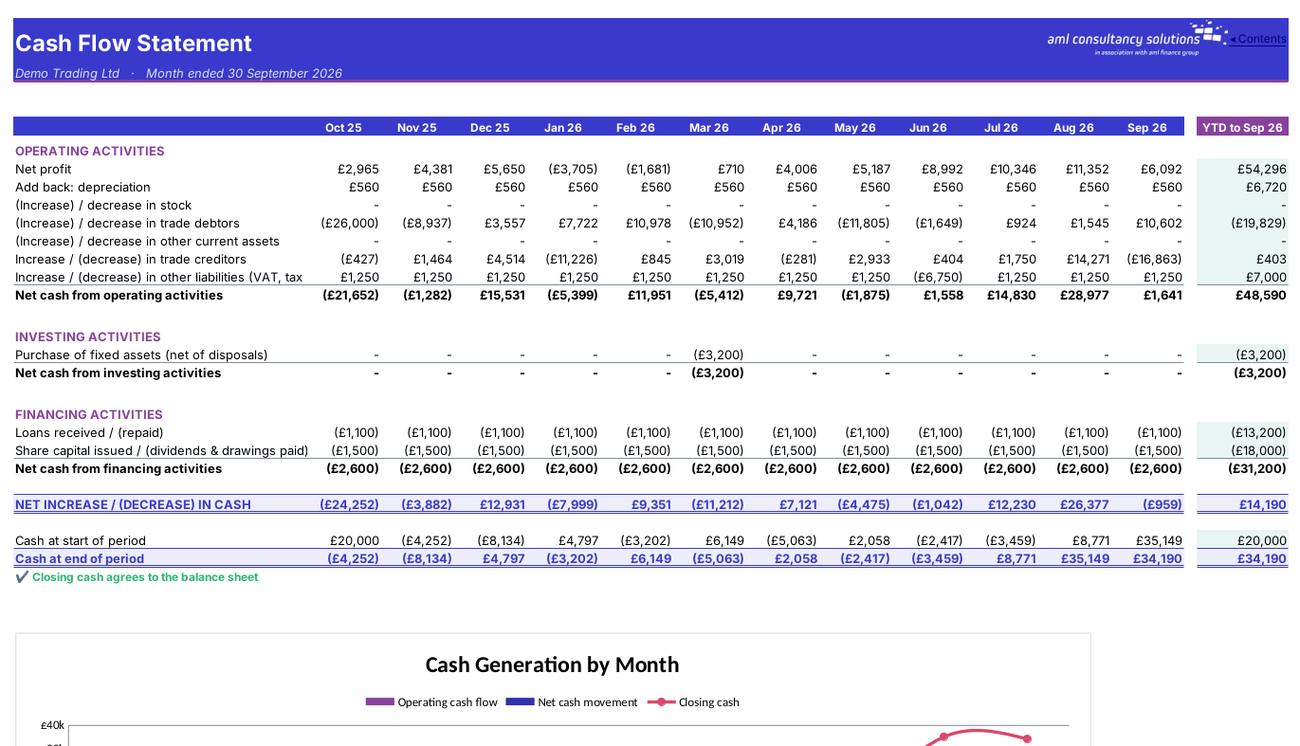
Cash Flow

Where cash came from and went, month by month and year to date, reconciled to the bank. What you do: write commentary on cash.

Who it is for

Made for people like you

  • Example – text
  • Owner-managers and directors – A clear monthly picture of profit, cash and financial health, without waiting for the year-end accounts.
  • Finance managers and bookkeepers – A board-ready pack straight from Xero in minutes, with commentary boxes for your explanations.
  • Accountants and advisers – A consistent monthly reporting format for clients, with variance analysis and ratio benchmarking built in.
  • Lenders and investors – Profit, balance sheet, cash flow and key ratios presented the way they expect to see them.
  • Your settings live on the Settings sheet – The company name, financial year start date and 'Prepared by' name are entered on the separate 'Settings' sheet (yellow cells C7, C8 and C9), together with 'VAT registered?' (C10). This User Manual is for reading only.

Quick start

Up and running in minutes

  1. Example – text
  1. Look at the sample – Open the Cover, then click through the Contents. The sample company, Demo Trading Ltd, has a full year of data so you can see every page working.
  2. Clear the sample data – Click 'Clear sample data' on the Settings sheet or the Dashboard. It empties the Transactions, Chart of Accounts, Opening Balances and Budget sheets and resets the company name to 'Your Company Ltd' and clears 'Prepared by' – formulas, charts and settings are kept.
  3. Enter your settings – On the Settings sheet type the company name (C7), the first day of the financial year (C8), who the pack is prepared by (C9) and whether the business is VAT registered (C10).
  4. Paste your Xero chart of accounts – Into the 'Chart of Accounts' sheet – see the step-by-step section below. Check nothing shows 'Unmapped' in column K.
  5. Paste your Xero transactions – Every transaction line for the year into the 'Transactions' sheet, in the eight-column layout described below.
  6. Enter opening balances – From the trial balance at the day before the year starts, on the 'Opening Balances' sheet.
  7. Add a budget (optional) – Twelve monthly figures per profit and loss account on the 'Budget' sheet.
  8. Pick the month and check – Choose the reporting month in the yellow box on the Dashboard and make sure the data check says the balance sheet balances.
  9. Write your commentary and print – Type your comments in the yellow boxes on the Executive Summary, Profit & Loss, Balance Sheet and Cash Flow, then print or save the pack as a PDF.

Key features

  • Executive Summary – Key figures vs budget, automatically written key messages and your commentary
  • Dashboard – Headline tiles, ratio gauges and charts – select the reporting month here
  • Profit & Loss – Detailed profit & loss by account – month, year to date and full-year budget, with variances
  • Balance Sheet – Financial position at month end compared with last month and the start of the year
  • Cash Flow – Where cash came from and went – monthly and year to date, reconciled to the bank
  • 12-Month Trend – Month-by-month results and balances for the whole year
  • Ratios – 18 financial ratios with traffic lights and plain-English explanations

What’s included

  • Executive Summary – Key figures vs budget, automatically written key messages and your commentary
  • Dashboard – Headline tiles, ratio gauges and charts – select the reporting month here
  • Profit & Loss – Detailed profit & loss by account – month, year to date and full-year budget, with variances
  • Balance Sheet – Financial position at month end compared with last month and the start of the year
  • Cash Flow – Where cash came from and went – monthly and year to date, reconciled to the bank
  • 12-Month Trend – Month-by-month results and balances for the whole year
  • Ratios – 18 financial ratios with traffic lights and plain-English explanations
  • Settings – Company name, year start, preparer, VAT and a quick Xero loading checklist
  • User Manual – Full step-by-step user manual – loading data, every report and ratio explained
  • Budget – Monthly budget by account
  • Transactions – Xero account transactions
  • Chart of Accounts – Xero chart of accounts and dashboard grouping
  • Opening Balances – Trial balance at the start of the year

How buying works

Your file is only released once payment has cleared.

1

Click Buy now

You are taken to our secure checkout.

2

Pay securely

Checkout takes a minute and you get a receipt by email.

3

Download your file

Your download link arrives as soon as payment clears.

Explore the range

Need it tailored to your business?

We can adapt any prebuilt solution or build something bespoke, with a lifetime bug-free guarantee.

Part of AML Finance Group

Need an accountant too?

Our sister firm, AML Accountancy Solutions, is an award-winning accountancy practice helping businesses and individuals across the UK with their accounts, tax, bookkeeping and payroll.

Visit AML Accountancy Solutions

